Cruise Ship Travel Joomla Template


Edit Template Offline
2. Create new page and search for id 6684061
Edit Template Online
Create Awesome Websites


Free Nicepage Builder
Keywords
Cruise Offers and Guest Assistance Divide the CMS Content Clearly
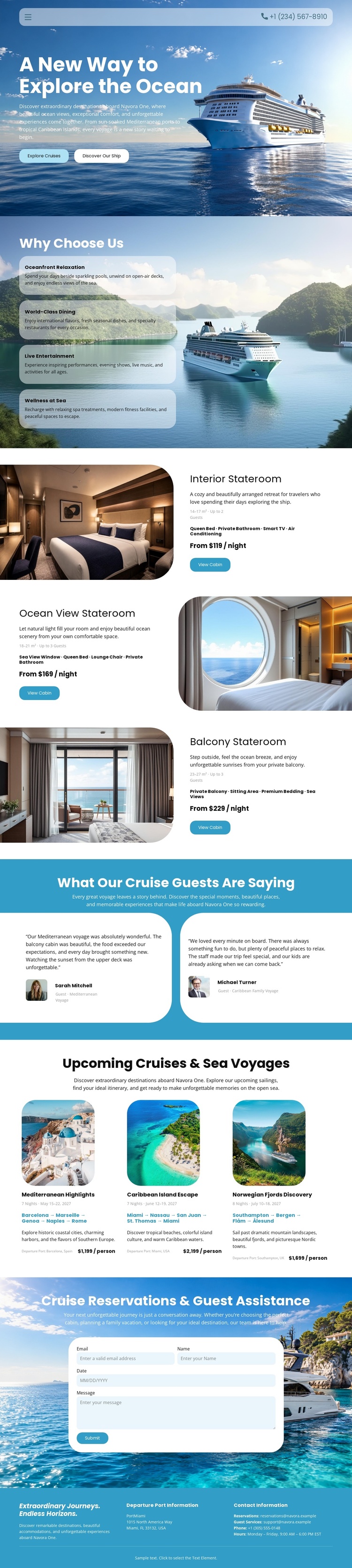
The service-oriented sections give this design several natural content regions for a Joomla-managed travel site. The four benefit items—Oceanfront Relaxation, World-Class Dining, Live Entertainment, and Wellness at Sea—form a structured information group that can remain visually coordinated while descriptions change over time. The three stateroom rows provide another recurring content area, with each option combining an image, accommodation description, nightly price, and “View Cabin” action.
The destination block introduces a different editorial grouping. Mediterranean Highlights, Caribbean Island Escape, and Norwegian Fjords Discovery are shown as separate cards containing imagery, itinerary text, and package prices. Together with the shared navigation and closing contact columns, these areas create a recognizable site structure rather than isolated promotional fragments. The testimonials add a separate guest-feedback region, while the reservation form provides a dedicated inquiry area for visitors who need assistance.
In a Joomla project, this division is useful because cruise benefits, accommodation information, destinations, and contact content have different maintenance purposes. The design can keep those regions visually connected while the site’s CMS-managed content is organized around the relevant sections. The important point is the relationship between the existing content groups and navigation, not an assumption that particular Joomla articles or modules already exist.
Customize with Nicepage
Open this ready-made template in the Joomla Page Builder and customize it visually in the Nicepage editor. Replace demo content, edit page sections, and adapt the design to your project without rebuilding the template from scratch.
Work With This Template in Joomla
Customize and Install the Joomla Template
Start with this ready-made template instead of building the Joomla design from scratch. Customize its layout, content, typography, images, sections, and other design elements visually in the Nicepage application, then export and install the Joomla Template, Nicepage Extension, and supported content on your Joomla website.
Edit the Template Directly in Joomla
After installation, you can edit the Joomla Template directly in Joomla with the Nicepage Joomla Extension. Customize the Header, Footer, Colors, Fonts, typography, and Page Templates from the Joomla workflow while keeping the site design connected with your CMS content.
Edit Joomla Articles Visually
Use the Nicepage Joomla Extension to open and edit Joomla Articles visually from the Joomla Administrator. Change text, images, sections, layouts, and other page content in the Nicepage editor while continuing to manage the Articles through Joomla.
Joomla Content and Template Integration
Use the customized template together with Joomla Articles, module Positions, menus, forms, Blog Pages, and other supported CMS elements. With the Nicepage Extension used as the Site Style Source, shared design settings can be applied across Joomla Articles while Joomla continues to provide the CMS environment for managing site content.
This workflow combines a ready-made Joomla Template with visual customization, direct template editing in Joomla, and continued content management through the Nicepage Joomla Extension.