The victories of our hospice Joomla Template



Organizational Information With a Parallel Counter Group
The “About Us” heading and supporting paragraph establish a compact organizational information region that can participate in a Joomla-managed page. The centered text is placed over a full-width photograph showing two people, including a person using a wheelchair, giving the section a human visual context while keeping the written introduction in one clearly bounded area. The darkened image and white typography support the relationship between the photograph and the explanatory copy.
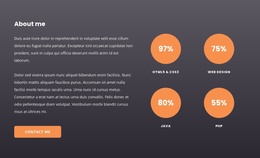
The lower portion changes from narrative content to structured impact information. Four equal-width orange cards form a horizontal counter group, with each item pairing a displayed number and an uppercase label: Specialists, Clients, Cases, and Awards. The visible values are 16, 700, 37, and 40. In a Joomla-oriented project, this arrangement can remain a stable visual content region while the surrounding site manages other pages and editorial material through its CMS environment. The block does not need to carry the whole site structure; its role is to present one recognizable organizational section whose paragraph and repeated metrics can be maintained alongside broader page content. The consistent card pattern also keeps the four information units distinct without introducing extra interaction.
Customize with Nicepage
Open this ready-made template in the Joomla Page Builder and customize it visually in the Nicepage editor. Replace demo content, edit page sections, and adapt the design to your project without rebuilding the template from scratch.
Edit Template Offline
2. Create a new page or select existing
3. Click Add new block, search for id 343705 and click enter
Edit Template Online
Create Awesome Websites


Free Nicepage Builder
Keywords
Work With This Template in Joomla
Customize and Install the Joomla Template
Start with this ready-made template instead of building the Joomla design from scratch. Customize its layout, content, typography, images, sections, and other design elements visually in the Nicepage application, then export and install the Joomla Template, Nicepage Extension, and supported content on your Joomla website.
Edit the Template Directly in Joomla
After installation, you can edit the Joomla Template directly in Joomla with the Nicepage Joomla Extension. Customize the Header, Footer, Colors, Fonts, typography, and Page Templates from the Joomla workflow while keeping the site design connected with your CMS content.
Edit Joomla Articles Visually
Use the Nicepage Joomla Extension to open and edit Joomla Articles visually from the Joomla Administrator. Change text, images, sections, layouts, and other page content in the Nicepage editor while continuing to manage the Articles through Joomla.
Joomla Content and Template Integration
Use the customized template together with Joomla Articles, module Positions, menus, forms, Blog Pages, and other supported CMS elements. With the Nicepage Extension used as the Site Style Source, shared design settings can be applied across Joomla Articles while Joomla continues to provide the CMS environment for managing site content.
This workflow combines a ready-made Joomla Template with visual customization, direct template editing in Joomla, and continued content management through the Nicepage Joomla Extension.