Infographics in simple words Joomla Template


Structured Information Around One Highlighted Percentage
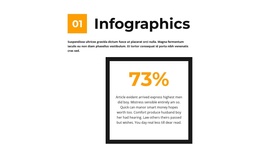
The heading, numbered orange marker, and introductory paragraph divide the block into a clear informational opening before the statistic is reached. The centered metric card then acts as a compact content region: its thick black rectangular border defines the boundary, the orange 73% sample value supplies the visual emphasis, and the paragraph below explains the figure’s intended supporting role. This makes the section suitable for presenting one piece of structured information without implying a larger dashboard or data system.
Within a Joomla-managed page, the block can serve as a stable infographic or statistics area alongside other editorial content. Its structure is more focused than a list of multiple categories: one subject is introduced, one metric is highlighted, and one explanation follows. The white field gives the section room to breathe, while black typography keeps the surrounding copy readable and the orange accents create a consistent path from the 01 marker to the percentage.
The sample text and displayed number are content placeholders rather than claims about an organization or measured result. They can therefore be replaced with the relevant wording and metric for the managed content area while preserving the visual relationship between introduction and card. The section’s fixed presentation also fits a straightforward CMS content region, with no tabs, accordion, gallery, or other confirmed interaction competing with the information.
Customize with Nicepage
Open this ready-made template in the Joomla Page Builder and customize it visually in the Nicepage editor. Replace demo content, edit page sections, and adapt the design to your project without rebuilding the template from scratch.
Edit Template Offline
2. Create a new page or select existing
3. Click Add new block, search for id 2552516 and click enter
Edit Template Online
Create Awesome Websites


Free Nicepage Builder
Keywords
Work With This Template in Joomla
Customize and Install the Joomla Template
Start with this ready-made template instead of building the Joomla design from scratch. Customize its layout, content, typography, images, sections, and other design elements visually in the Nicepage application, then export and install the Joomla Template, Nicepage Extension, and supported content on your Joomla website.
Edit the Template Directly in Joomla
After installation, you can edit the Joomla Template directly in Joomla with the Nicepage Joomla Extension. Customize the Header, Footer, Colors, Fonts, typography, and Page Templates from the Joomla workflow while keeping the site design connected with your CMS content.
Edit Joomla Articles Visually
Use the Nicepage Joomla Extension to open and edit Joomla Articles visually from the Joomla Administrator. Change text, images, sections, layouts, and other page content in the Nicepage editor while continuing to manage the Articles through Joomla.
Joomla Content and Template Integration
Use the customized template together with Joomla Articles, module Positions, menus, forms, Blog Pages, and other supported CMS elements. With the Nicepage Extension used as the Site Style Source, shared design settings can be applied across Joomla Articles while Joomla continues to provide the CMS environment for managing site content.
This workflow combines a ready-made Joomla Template with visual customization, direct template editing in Joomla, and continued content management through the Nicepage Joomla Extension.