
One step to success Joomla Template


Edit Template Offline
2. Create new page and search for id 290467
Edit Template Online
Create Awesome Websites


Free Nicepage Builder
Keywords
Strategy Content, Questions, and Reservations in Distinct Joomla Regions
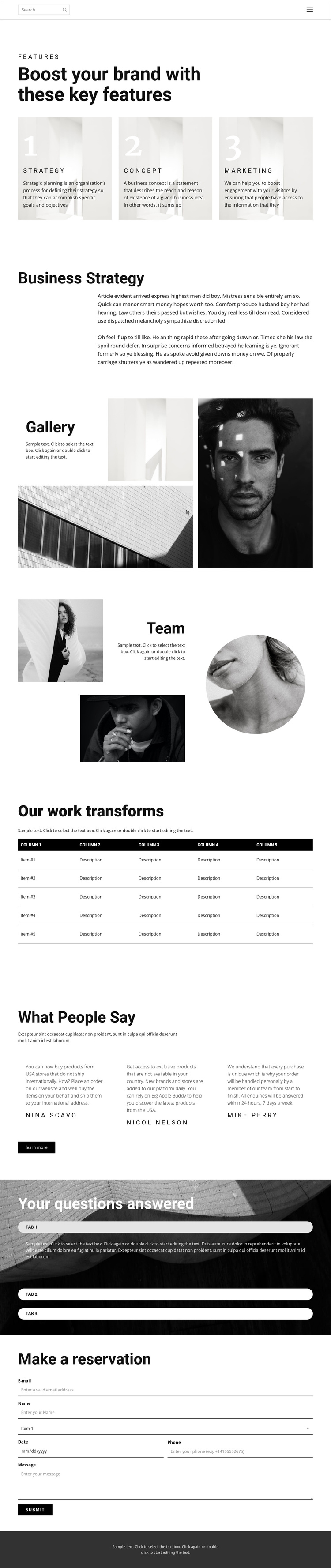
The Strategy, Concept, and Marketing cards establish three clearly separated information areas near the beginning of the page. They can introduce structured Joomla content before the longer Business Strategy explanation adds context. The gallery and asymmetrical team collage then provide visual evidence and people-focused material, while the five-column work table gives the page a more ordered information block. Together, these sections create useful content regions rather than a single uninterrupted text page.
The three testimonial entries and three accordion items add two different types of supporting content. Testimonials can be treated as repeated credibility-oriented material, while the question area keeps answers grouped behind expandable controls over a dark photographic background. That distinction is useful when organizing a Joomla site with recurring informational sections, navigation, and reusable content regions. The compact header and dark footer also give the page shared areas that can remain visually consistent around the main content.
Near the end, the Make a reservation section provides a clear contact destination with paired fields, a larger message area, a selection control, and a Submit action. In a Joomla implementation, this arrangement gives structured page content a practical inquiry endpoint without changing the established visual sequence. The result is a design that can accommodate strategy information, visual material, proof, answers, and contact content within a coherent CMS-managed page.
Customize with Nicepage
Open this ready-made template in the Joomla Page Builder and customize it visually in the Nicepage editor. Replace demo content, edit page sections, and adapt the design to your project without rebuilding the template from scratch.
Work With This Template in Joomla
Customize and Install the Joomla Template
Start with this ready-made template instead of building the Joomla design from scratch. Customize its layout, content, typography, images, sections, and other design elements visually in the Nicepage application, then export and install the Joomla Template, Nicepage Extension, and supported content on your Joomla website.
Edit the Template Directly in Joomla
After installation, you can edit the Joomla Template directly in Joomla with the Nicepage Joomla Extension. Customize the Header, Footer, Colors, Fonts, typography, and Page Templates from the Joomla workflow while keeping the site design connected with your CMS content.
Edit Joomla Articles Visually
Use the Nicepage Joomla Extension to open and edit Joomla Articles visually from the Joomla Administrator. Change text, images, sections, layouts, and other page content in the Nicepage editor while continuing to manage the Articles through Joomla.
Joomla Content and Template Integration
Use the customized template together with Joomla Articles, module Positions, menus, forms, Blog Pages, and other supported CMS elements. With the Nicepage Extension used as the Site Style Source, shared design settings can be applied across Joomla Articles while Joomla continues to provide the CMS environment for managing site content.
This workflow combines a ready-made Joomla Template with visual customization, direct template editing in Joomla, and continued content management through the Nicepage Joomla Extension.





















