Your professional opportunity Joomla Template


Edit Template Offline
2. Create new page and search for id 6056508
Edit Template Online
Create Awesome Websites


Free Nicepage Builder
Keywords
Contact Categories and Support Details Divide the CMS Content Clearly
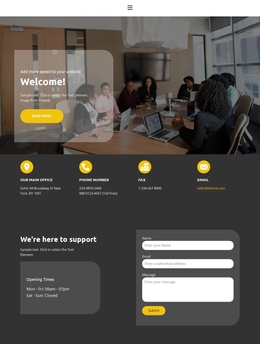
The office, phone, fax, and email cards provide four distinct information areas that can remain visually coordinated while their underlying content is maintained as separate contact details. This organization suits a Joomla project because the page does not rely on one undifferentiated paragraph for communication. Navigation leads into the contact content, the repeated cards establish reference information, and the lower support block gives visitors a separate place to submit a message.
The support block has a particularly clear content relationship. The Opening Times panel qualifies when assistance is available, while the neighboring form collects a name, email address, and message. Together, these areas distinguish informational content from visitor-submitted content. The group-meeting photograph and Welcome! card provide context at the top, but the page's operational value comes from the transition toward contact categories and the final support response.
In a Joomla implementation, these regions can be treated as structured site content without changing the visual order: navigation and shared page framing can remain consistent, while office details, availability text, and support wording are maintained as the project develops. The demo address, telephone values, fax number, and email are structural placeholders, not verified business data. Their presence shows which content categories the design expects, while the dark panels and yellow accents keep those regions within one recognizable template system.
Customize with Nicepage
Open this ready-made template in the Joomla Page Builder and customize it visually in the Nicepage editor. Replace demo content, edit page sections, and adapt the design to your project without rebuilding the template from scratch.
Work With This Template in Joomla
Customize and Install the Joomla Template
Start with this ready-made template instead of building the Joomla design from scratch. Customize its layout, content, typography, images, sections, and other design elements visually in the Nicepage application, then export and install the Joomla Template, Nicepage Extension, and supported content on your Joomla website.
Edit the Template Directly in Joomla
After installation, you can edit the Joomla Template directly in Joomla with the Nicepage Joomla Extension. Customize the Header, Footer, Colors, Fonts, typography, and Page Templates from the Joomla workflow while keeping the site design connected with your CMS content.
Edit Joomla Articles Visually
Use the Nicepage Joomla Extension to open and edit Joomla Articles visually from the Joomla Administrator. Change text, images, sections, layouts, and other page content in the Nicepage editor while continuing to manage the Articles through Joomla.
Joomla Content and Template Integration
Use the customized template together with Joomla Articles, module Positions, menus, forms, Blog Pages, and other supported CMS elements. With the Nicepage Extension used as the Site Style Source, shared design settings can be applied across Joomla Articles while Joomla continues to provide the CMS environment for managing site content.
This workflow combines a ready-made Joomla Template with visual customization, direct template editing in Joomla, and continued content management through the Nicepage Joomla Extension.