Top five Joomla Template


Profile Records Form a Structured Team Content Region
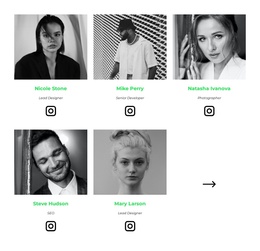
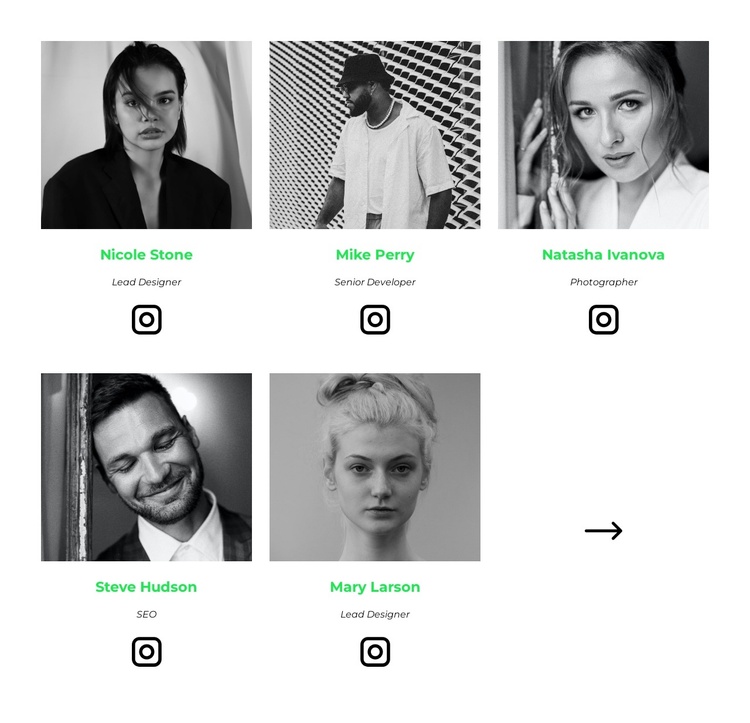
The five profile cells give this section a compact structured-information role within a Joomla-managed page. Each one communicates a person through the same sequence: portrait first, name as the primary identifier, role label beneath it, and an Instagram link for social access. That repeated content model makes the section suitable for a stable team or contributors area while the broader Joomla project manages other page content around it. The names and labels provide clear editorial units without requiring the block to carry an entire site identity.
The two-row, three-column grid also creates a defined visual region. Five cells are populated with profiles, while the remaining cell holds a directional arrow icon, separating the navigation-like visual cue from the team information. Centered alignment and generous spacing keep each profile readable. Grayscale portraits reduce visual competition between photographs, bright green names mark the principal accent, italic role labels create a secondary hierarchy, and large black Instagram icons make the social destination easy to recognize.
In a Joomla context, the block can function as one reusable visual content region for structured team information, whether it appears near an introduction, services explanation, or other page material. The Nicepage Joomla workflow can connect visual design with Joomla content in the surrounding project, but the section itself remains a five-profile block. Its stable repeated structure makes it easier to preserve the same presentation while related editorial content is maintained elsewhere in the CMS-managed site.
Customize with Nicepage
Open this ready-made template in the Joomla Page Builder and customize it visually in the Nicepage editor. Replace demo content, edit page sections, and adapt the design to your project without rebuilding the template from scratch.
Edit Template Offline
2. Create a new page or select existing
3. Click Add new block, search for id 2757037 and click enter
Edit Template Online
Create Awesome Websites


Free Nicepage Builder
Keywords
Work With This Template in Joomla
Customize and Install the Joomla Template
Start with this ready-made template instead of building the Joomla design from scratch. Customize its layout, content, typography, images, sections, and other design elements visually in the Nicepage application, then export and install the Joomla Template, Nicepage Extension, and supported content on your Joomla website.
Edit the Template Directly in Joomla
After installation, you can edit the Joomla Template directly in Joomla with the Nicepage Joomla Extension. Customize the Header, Footer, Colors, Fonts, typography, and Page Templates from the Joomla workflow while keeping the site design connected with your CMS content.
Edit Joomla Articles Visually
Use the Nicepage Joomla Extension to open and edit Joomla Articles visually from the Joomla Administrator. Change text, images, sections, layouts, and other page content in the Nicepage editor while continuing to manage the Articles through Joomla.
Joomla Content and Template Integration
Use the customized template together with Joomla Articles, module Positions, menus, forms, Blog Pages, and other supported CMS elements. With the Nicepage Extension used as the Site Style Source, shared design settings can be applied across Joomla Articles while Joomla continues to provide the CMS environment for managing site content.
This workflow combines a ready-made Joomla Template with visual customization, direct template editing in Joomla, and continued content management through the Nicepage Joomla Extension.