Digital world of technology Joomla Template


Edit Template Offline
2. Create new page and search for id 20573
Edit Template Online
Create Awesome Websites


Free Nicepage Builder
Keywords
Device Categories and Product Regions Form Structured CMS Content Areas
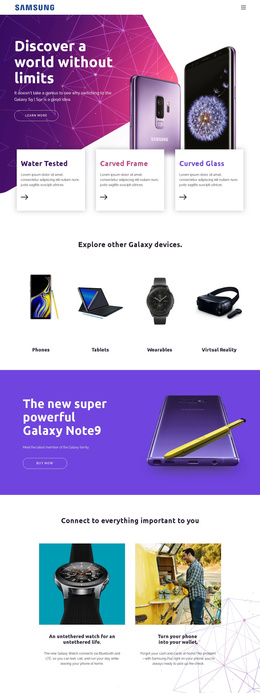
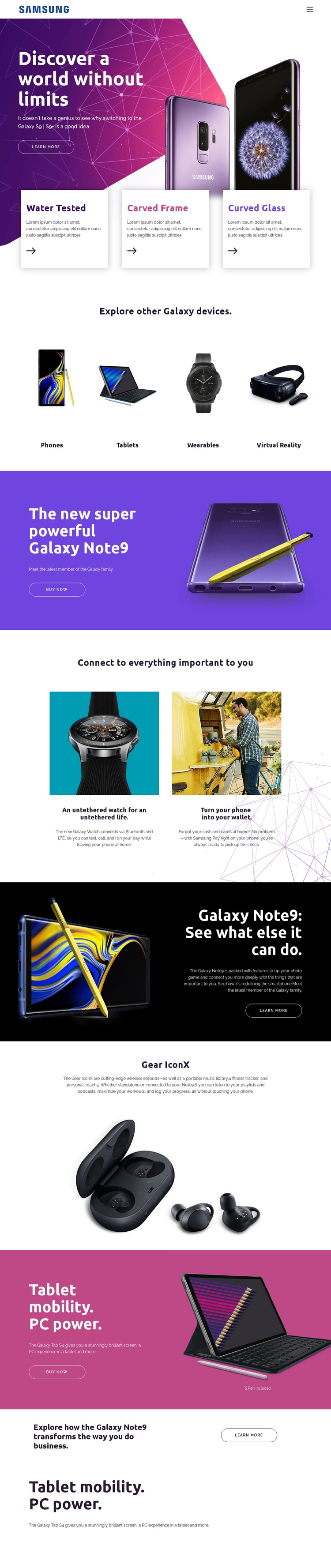
The four-item category grid gives the page a useful content division before visitors reach the deeper product sections. Phones, Tablets, Wearables, and Virtual Reality are presented as separate image-and-label areas, so a Joomla-managed project can treat them as recognizable navigation or informational regions rather than one undifferentiated technology block. The opening Galaxy hero and its Water Tested, Carved Frame, and Curved Glass cards provide a separate feature-led introduction.
The rest of the page is organized around recurring product content. Galaxy Note9 has both a purchase-oriented band and a capability section; Galaxy Watch and Samsung Pay form a paired connected-device area; Gear IconX receives its own wireless-earbuds presentation; and Galaxy Tab S4 appears in promotional sections with Buy now actions. These relationships suggest a structured content model in which product information, related features, and commercial actions remain visually coordinated while being maintained as distinct site areas.
Shared navigation and mobile navigation support movement across the long presentation, while the repeated product bands provide consistent regions for future content updates. The design can therefore serve a Joomla project that needs a strong editorial arrangement for device and service information without changing the page’s visual logic. Its value is not a generic CMS label, but the way categories, product stories, feature descriptions, and actions are already separated for organized management.
Customize with Nicepage
Open this ready-made template in the Joomla Page Builder and customize it visually in the Nicepage editor. Replace demo content, edit page sections, and adapt the design to your project without rebuilding the template from scratch.
Work With This Template in Joomla
Customize and Install the Joomla Template
Start with this ready-made template instead of building the Joomla design from scratch. Customize its layout, content, typography, images, sections, and other design elements visually in the Nicepage application, then export and install the Joomla Template, Nicepage Extension, and supported content on your Joomla website.
Edit the Template Directly in Joomla
After installation, you can edit the Joomla Template directly in Joomla with the Nicepage Joomla Extension. Customize the Header, Footer, Colors, Fonts, typography, and Page Templates from the Joomla workflow while keeping the site design connected with your CMS content.
Edit Joomla Articles Visually
Use the Nicepage Joomla Extension to open and edit Joomla Articles visually from the Joomla Administrator. Change text, images, sections, layouts, and other page content in the Nicepage editor while continuing to manage the Articles through Joomla.
Joomla Content and Template Integration
Use the customized template together with Joomla Articles, module Positions, menus, forms, Blog Pages, and other supported CMS elements. With the Nicepage Extension used as the Site Style Source, shared design settings can be applied across Joomla Articles while Joomla continues to provide the CMS environment for managing site content.
This workflow combines a ready-made Joomla Template with visual customization, direct template editing in Joomla, and continued content management through the Nicepage Joomla Extension.