New technology perspectives Joomla Template



Edit Template Offline
2. Create new page and search for id 1241583
Edit Template Online
Create Awesome Websites


Free Nicepage Builder
Keywords
Technology categories and program cards form reusable content regions
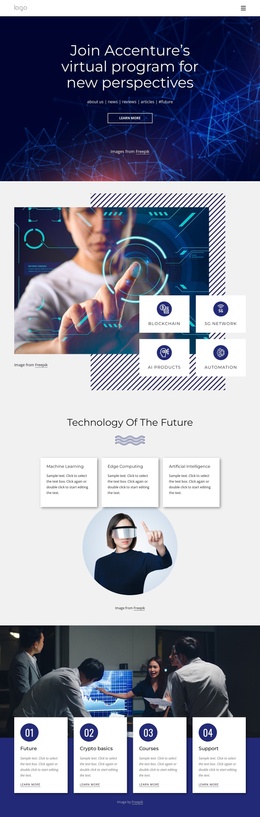
The page divides its subject into several information regions that are meaningful beyond the opening hero. The capability showcase groups Machine Learning, Edge Computing, Artificial Intelligence, Blockchain, 5G Network, AI Products, and Automation around a central technology image. Those labels give a Joomla project structured subject areas to maintain, while the repeated card treatment keeps related information visually coordinated. The four numbered cards provide a different type of region, presenting Future, Crypto basics, Courses, and Support as a sequential program or learning path.
The AI & Digital Platform section adds a focused content area with a heading, short description, Learn more action, and human-machine handshake image. It can sit alongside the broader technology categories as a distinct platform-related region rather than being mixed into every card. The Essential 8 Emerging Technologies section further organizes information into three parallel columns, which creates a useful editorial division for explanatory material. Navigation at the top, the recurring dark visual treatment, and the final footer help connect these regions into one site presentation. The newsletter section supplies a separate subscription area with an email field and Subscribe action, allowing the page to distinguish informational content from audience response. Together, these areas provide a clear CMS-oriented arrangement without assuming that any specific Joomla article or module already exists.
Customize with Nicepage
Open this ready-made template in the Joomla Page Builder and customize it visually in the Nicepage editor. Replace demo content, edit page sections, and adapt the design to your project without rebuilding the template from scratch.
Work With This Template in Joomla
Customize and Install the Joomla Template
Start with this ready-made template instead of building the Joomla design from scratch. Customize its layout, content, typography, images, sections, and other design elements visually in the Nicepage application, then export and install the Joomla Template, Nicepage Extension, and supported content on your Joomla website.
Edit the Template Directly in Joomla
After installation, you can edit the Joomla Template directly in Joomla with the Nicepage Joomla Extension. Customize the Header, Footer, Colors, Fonts, typography, and Page Templates from the Joomla workflow while keeping the site design connected with your CMS content.
Edit Joomla Articles Visually
Use the Nicepage Joomla Extension to open and edit Joomla Articles visually from the Joomla Administrator. Change text, images, sections, layouts, and other page content in the Nicepage editor while continuing to manage the Articles through Joomla.
Joomla Content and Template Integration
Use the customized template together with Joomla Articles, module Positions, menus, forms, Blog Pages, and other supported CMS elements. With the Nicepage Extension used as the Site Style Source, shared design settings can be applied across Joomla Articles while Joomla continues to provide the CMS environment for managing site content.
This workflow combines a ready-made Joomla Template with visual customization, direct template editing in Joomla, and continued content management through the Nicepage Joomla Extension.