Benefits in tables WordPress Theme


Stable Record Content Fits a WordPress-Managed Page
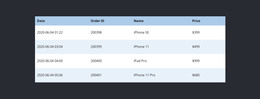
The table reads as stable page content because it presents a defined set of order records rather than a changing editorial stream. Date, Order ID, Name, and Price establish four dependable fields, and the five visible rows demonstrate how individual records can remain aligned within one reusable section. The product names include iPhone SE, iPhone 11, iPad Pro, iPhone 11 Pro, and Headphone, while the dollar amounts show the intended treatment of price information without turning sample values into actual store data.
Its page-oriented role is reinforced by the visual structure. The black header row identifies the data fields, alternating pale blue-gray rows help distinguish entries, and the centered table remains separated from the light hardware background by generous white space. A computer keyboard at the upper left and smartphone at the lower right provide a technology-related setting for the records. In a WordPress-oriented project, this section could remain part of a stable account, order-history, or product-information page while the wider site manages other content around it. The block contributes a focused content region; it does not need to represent the complete theme or CMS structure. Its value is the consistent relationship between reusable page content and a readable table layout.
Customize with Nicepage
Open this ready-made template in the WordPress Website Builder and customize it visually in the Nicepage editor. Replace demo content, edit page sections, and adapt the design to your project without rebuilding the template from scratch.
Edit Template Offline
2. Create a new page or select existing
3. Click Add new block, search for id 85612 and click enter
Edit Template Online
Create Awesome Websites


Free Nicepage Builder
Keywords
Manage and Edit This Theme in WordPress
Customize and Install the WordPress Theme
Start with this ready-made theme instead of building the WordPress design from scratch. Customize its layout, content, typography, images, sections, and other design elements visually in Nicepage editor, then export and install the WordPress Theme, Plugin, and Pages on your WordPress site. The Nicepage WordPress Plugin lets you continue working with the site after installation.
Edit the Theme Directly in WordPress
After installation, you can edit the WordPress Theme directly in WordPress with the Nicepage WordPress Plugin. Use Site Style to customize site Colors, Fonts, Header, Footer, Blog, and Post Page Templates while working within your WordPress website.
Edit WordPress Pages Visually
Use the Nicepage WordPress Plugin to edit page content directly from the WordPress admin area. Open a WordPress Page with Nicepage and visually change its text, images, sections, and other page elements while continuing to manage the Page through WordPress.
WordPress Content and Theme Integration
Use the customized theme with WordPress Pages, Posts, Blog and Post Templates, menus, widgets, and other CMS-managed content. Shared theme elements such as Colors, Fonts, Header, Footer, Blog, and Post Page Templates can be managed as part of the overall site design, while WordPress provides the CMS environment for managing site content.
This workflow combines a ready-made WordPress Theme with visual customization, direct theme editing in WordPress, and continued content management through the Nicepage WordPress Plugin.