
Digital agency anniversary WordPress Theme


Edit Template Offline
2. Create new page and search for id 6633719
Edit Template Online
Create Awesome Websites


Free Nicepage Builder
Keywords
Service Pages and Anniversary Content Fit the Theme’s Page-Oriented Structure
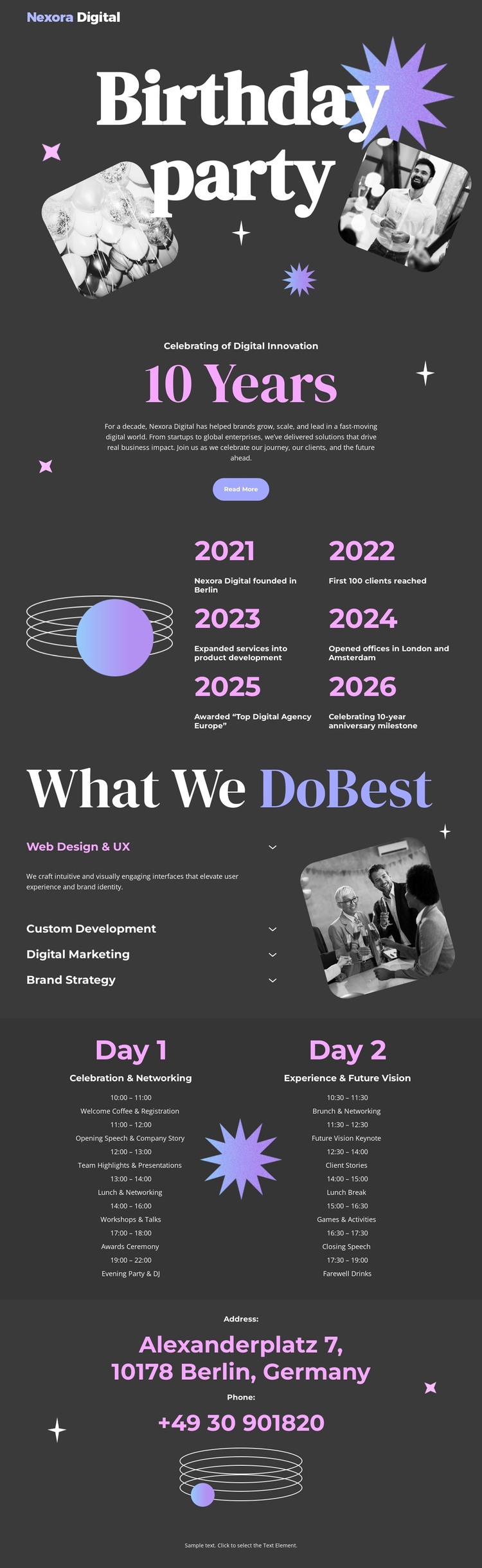
The four service labels create the clearest permanent content areas in this design: web design and UX, custom development, digital marketing, and brand strategy. In a WordPress-managed project, these areas can guide page-oriented agency content while the dark charcoal background, editorial serif headings, compact sans-serif text, and angled photographic treatment keep the presentation visually connected. The template does not need to be treated as an existing collection of service pages; its verified service section simply provides a strong basis for organizing them.
The 10 Years section offers a different content relationship. Six displayed year milestones and short descriptions present a history sequence that could support an agency background or anniversary page. The two-day schedule is more time-specific, separating event information into parallel Day 1 and Day 2 columns. Together, these sections show how permanent agency information and occasion-based content can coexist within one theme without being confused with one another.
The closing Address section groups the displayed Berlin location and telephone details into a recognizable contact area, while the opening Birthday party block supplies the page’s editorial entry point. The Read More button connects that introduction to the deeper content below. If the project later adds regularly updated announcements, those could be interpreted alongside the existing permanent service and contact areas, but no blog or post structure is claimed as already present. The theme’s value comes from keeping these content categories within one consistent visual system.
Customize with Nicepage
Open this ready-made template in the WordPress Website Builder and customize it visually in the Nicepage editor. Replace demo content, edit page sections, and adapt the design to your project without rebuilding the template from scratch.
Manage and Edit This Theme in WordPress
Customize and Install the WordPress Theme
Start with this ready-made theme instead of building the WordPress design from scratch. Customize its layout, content, typography, images, sections, and other design elements visually in Nicepage editor, then export and install the WordPress Theme, Plugin, and Pages on your WordPress site. The Nicepage WordPress Plugin lets you continue working with the site after installation.
Edit the Theme Directly in WordPress
After installation, you can edit the WordPress Theme directly in WordPress with the Nicepage WordPress Plugin. Use Site Style to customize site Colors, Fonts, Header, Footer, Blog, and Post Page Templates while working within your WordPress website.
Edit WordPress Pages Visually
Use the Nicepage WordPress Plugin to edit page content directly from the WordPress admin area. Open a WordPress Page with Nicepage and visually change its text, images, sections, and other page elements while continuing to manage the Page through WordPress.
WordPress Content and Theme Integration
Use the customized theme with WordPress Pages, Posts, Blog and Post Templates, menus, widgets, and other CMS-managed content. Shared theme elements such as Colors, Fonts, Header, Footer, Blog, and Post Page Templates can be managed as part of the overall site design, while WordPress provides the CMS environment for managing site content.
This workflow combines a ready-made WordPress Theme with visual customization, direct theme editing in WordPress, and continued content management through the Nicepage WordPress Plugin.





















