
One-Day Workshop WordPress Theme


Edit Template Offline
2. Create new page and search for id 6616337
Edit Template Online
Create Awesome Websites


Free Nicepage Builder
Keywords
Learning Pages and Event Details Can Share One WordPress Theme Direction
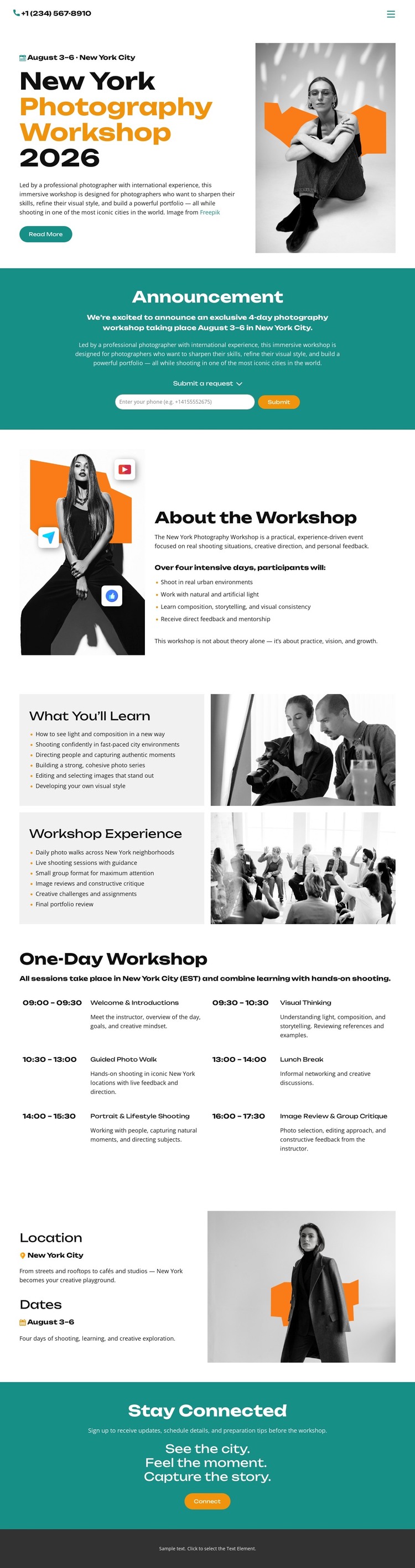
The page contains several types of permanent content that can translate naturally into a WordPress-managed site. About the Workshop provides page-oriented background information, while What You’ll Learn and Workshop Experience offer distinct areas for educational and event content. Those areas could remain part of the theme’s visual system as the project adds related workshop descriptions or announcements, without claiming that WordPress Posts, categories, or blog structures already exist.
The schedule offers a different content relationship: six time-and-activity entries present the day as an ordered event plan. Location and Dates then give logistical information its own place, while the announcement request and Stay Connected sections support participation-oriented communication. In a WordPress project, these permanent page areas could coexist with future editorial or announcement content while retaining the same grayscale portrait treatment, orange hierarchy, teal emphasis bands, and dark footer. The design therefore works as a theme foundation because it connects educational information, event logistics, repeated content areas, and visitor response points through one consistent visual direction. The WordPress interpretation comes from the content structure, not from assuming that CMS-specific elements are already present.
Customize with Nicepage
Open this ready-made template in the WordPress Website Builder and customize it visually in the Nicepage editor. Replace demo content, edit page sections, and adapt the design to your project without rebuilding the template from scratch.
Manage and Edit This Theme in WordPress
Customize and Install the WordPress Theme
Start with this ready-made theme instead of building the WordPress design from scratch. Customize its layout, content, typography, images, sections, and other design elements visually in Nicepage editor, then export and install the WordPress Theme, Plugin, and Pages on your WordPress site. The Nicepage WordPress Plugin lets you continue working with the site after installation.
Edit the Theme Directly in WordPress
After installation, you can edit the WordPress Theme directly in WordPress with the Nicepage WordPress Plugin. Use Site Style to customize site Colors, Fonts, Header, Footer, Blog, and Post Page Templates while working within your WordPress website.
Edit WordPress Pages Visually
Use the Nicepage WordPress Plugin to edit page content directly from the WordPress admin area. Open a WordPress Page with Nicepage and visually change its text, images, sections, and other page elements while continuing to manage the Page through WordPress.
WordPress Content and Theme Integration
Use the customized theme with WordPress Pages, Posts, Blog and Post Templates, menus, widgets, and other CMS-managed content. Shared theme elements such as Colors, Fonts, Header, Footer, Blog, and Post Page Templates can be managed as part of the overall site design, while WordPress provides the CMS environment for managing site content.
This workflow combines a ready-made WordPress Theme with visual customization, direct theme editing in WordPress, and continued content management through the Nicepage WordPress Plugin.





















