BrandBoost Solutions WordPress Theme


Stable Topic Content for a WordPress-Managed Page
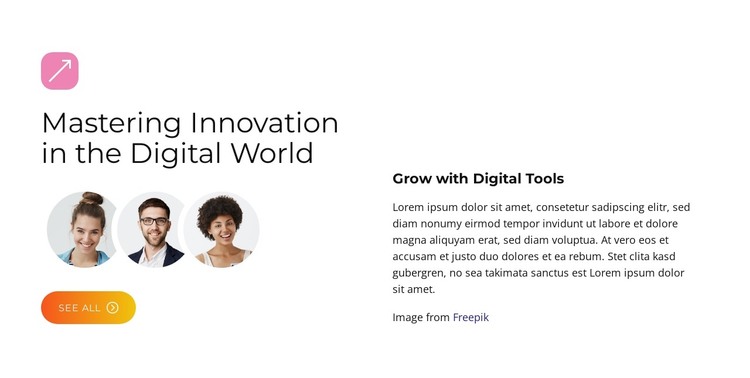
The two headings give this section a durable page-content role. “Mastering Innovation in the Digital World” provides the main subject, while “Grow with Digital Tools” frames the supporting explanation on the opposite side. Three circular portraits add a repeatable visual group beneath the primary heading, and the “See All” button offers a destination for related material. The paragraph remains a separate content area, so the section can communicate its topic without merging every element into one dense column.
In a WordPress-managed project, this arrangement can serve as stable content on a page while the wider site handles other pages and publishing needs. The demo paragraph should be replaced with the intended copy, but its position and relationship to the heading can remain consistent. The restrained black typography and white background make the section adaptable to a broader page style, while the warm gradient button provides a defined action accent and the portraits add human context.
The block should be understood as one page section within the surrounding theme and content system. It can introduce a topic before more detailed information, related material, or another response point, while its own visual structure remains intact.
Customize with Nicepage
Open this ready-made template in the WordPress Website Builder and customize it visually in the Nicepage editor. Replace demo content, edit page sections, and adapt the design to your project without rebuilding the template from scratch.
Edit Template Offline
2. Create a new page or select existing
3. Click Add new block, search for id 6479169 and click enter
Edit Template Online
Create Awesome Websites


Free Nicepage Builder
Keywords
Manage and Edit This Theme in WordPress
Customize and Install the WordPress Theme
Start with this ready-made theme instead of building the WordPress design from scratch. Customize its layout, content, typography, images, sections, and other design elements visually in Nicepage editor, then export and install the WordPress Theme, Plugin, and Pages on your WordPress site. The Nicepage WordPress Plugin lets you continue working with the site after installation.
Edit the Theme Directly in WordPress
After installation, you can edit the WordPress Theme directly in WordPress with the Nicepage WordPress Plugin. Use Site Style to customize site Colors, Fonts, Header, Footer, Blog, and Post Page Templates while working within your WordPress website.
Edit WordPress Pages Visually
Use the Nicepage WordPress Plugin to edit page content directly from the WordPress admin area. Open a WordPress Page with Nicepage and visually change its text, images, sections, and other page elements while continuing to manage the Page through WordPress.
WordPress Content and Theme Integration
Use the customized theme with WordPress Pages, Posts, Blog and Post Templates, menus, widgets, and other CMS-managed content. Shared theme elements such as Colors, Fonts, Header, Footer, Blog, and Post Page Templates can be managed as part of the overall site design, while WordPress provides the CMS environment for managing site content.
This workflow combines a ready-made WordPress Theme with visual customization, direct theme editing in WordPress, and continued content management through the Nicepage WordPress Plugin.