Advisory and consulting services WordPress Theme


Stable Advisory Content With a Visual Gallery Focus
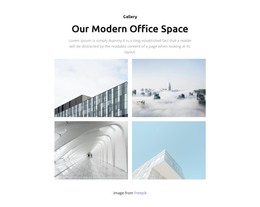
The heading and supporting paragraph make this block read as stable page content about advisory and consulting services, while the four-image gallery adds a visual layer to that information. Document signing, writing, collaboration, and an office workspace provide related subjects that can remain together as one publishable section. The “view more” button offers a continuation point, and lightbox viewing lets visitors examine individual images without losing the context of the gallery.
Within a WordPress-managed page or site, this arrangement can function as a reusable services or visual-content region alongside other page content. Its dark navy-blue background and white centered typography give the section a defined presentation, while the generous spacing keeps the heading, image row, and button distinct. The content is better understood as a permanent page area than as a stream of dated editorial entries: it introduces one service theme and organizes supporting imagery around it. A wider WordPress project can place related service explanations, articles, or contact content elsewhere. The block contributes a consistent visual section to that environment without becoming a standalone WordPress Theme or supplying the site’s complete CMS structure.
Customize with Nicepage
Open this ready-made template in the WordPress Website Builder and customize it visually in the Nicepage editor. Replace demo content, edit page sections, and adapt the design to your project without rebuilding the template from scratch.
Edit Template Offline
2. Create a new page or select existing
3. Click Add new block, search for id 61849 and click enter
Edit Template Online
Create Awesome Websites


Free Nicepage Builder
Keywords
Manage and Edit This Theme in WordPress
Customize and Install the WordPress Theme
Start with this ready-made theme instead of building the WordPress design from scratch. Customize its layout, content, typography, images, sections, and other design elements visually in Nicepage editor, then export and install the WordPress Theme, Plugin, and Pages on your WordPress site. The Nicepage WordPress Plugin lets you continue working with the site after installation.
Edit the Theme Directly in WordPress
After installation, you can edit the WordPress Theme directly in WordPress with the Nicepage WordPress Plugin. Use Site Style to customize site Colors, Fonts, Header, Footer, Blog, and Post Page Templates while working within your WordPress website.
Edit WordPress Pages Visually
Use the Nicepage WordPress Plugin to edit page content directly from the WordPress admin area. Open a WordPress Page with Nicepage and visually change its text, images, sections, and other page elements while continuing to manage the Page through WordPress.
WordPress Content and Theme Integration
Use the customized theme with WordPress Pages, Posts, Blog and Post Templates, menus, widgets, and other CMS-managed content. Shared theme elements such as Colors, Fonts, Header, Footer, Blog, and Post Page Templates can be managed as part of the overall site design, while WordPress provides the CMS environment for managing site content.
This workflow combines a ready-made WordPress Theme with visual customization, direct theme editing in WordPress, and continued content management through the Nicepage WordPress Plugin.