Meet and fast food WordPress Theme


Food Photography Provides Stable Page Content Around a Central Title
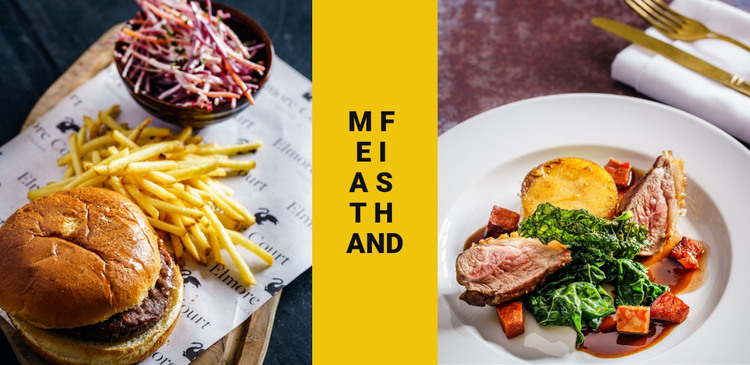
The block reads as durable visual page content because its message is carried by a fixed arrangement of food photography and typography. On the left, a burger, fries, and salad bowl create one prepared-food scene. On the right, plated meat with vegetables provides a second scene. The narrow yellow panel between them carries vertically stacked black uppercase lettering, giving the section a consistent visual label without relying on a changing list of posts or other editorial elements.
Within WordPress-managed page content, this structure can fit a stable dining, restaurant, or food-focused information area. The image subjects provide the visual theme, while the center panel separates and organizes them. Because the interaction is static, the section can remain a predictable part of a page while other content around it changes through the wider project. The block’s role is therefore a reusable presentation area, not a complete WordPress Theme or a substitute for the surrounding site structure.
Its strongest content relationship is between paired imagery and the central title treatment. The left and right photographs are distinct but related, and the yellow panel prevents them from merging into one undifferentiated strip. A WordPress-oriented project can preserve that relationship as permanent page content while adding other sections for menus, descriptions, contact details, or updates. The result is a focused visual component that supports the page without claiming CMS features not shown inside the block.
Customize with Nicepage
Open this ready-made template in the WordPress Website Builder and customize it visually in the Nicepage editor. Replace demo content, edit page sections, and adapt the design to your project without rebuilding the template from scratch.
Edit Template Offline
2. Create a new page or select existing
3. Click Add new block, search for id 61848 and click enter
Edit Template Online
Create Awesome Websites


Free Nicepage Builder
Keywords
Manage and Edit This Theme in WordPress
Customize and Install the WordPress Theme
Start with this ready-made theme instead of building the WordPress design from scratch. Customize its layout, content, typography, images, sections, and other design elements visually in Nicepage editor, then export and install the WordPress Theme, Plugin, and Pages on your WordPress site. The Nicepage WordPress Plugin lets you continue working with the site after installation.
Edit the Theme Directly in WordPress
After installation, you can edit the WordPress Theme directly in WordPress with the Nicepage WordPress Plugin. Use Site Style to customize site Colors, Fonts, Header, Footer, Blog, and Post Page Templates while working within your WordPress website.
Edit WordPress Pages Visually
Use the Nicepage WordPress Plugin to edit page content directly from the WordPress admin area. Open a WordPress Page with Nicepage and visually change its text, images, sections, and other page elements while continuing to manage the Page through WordPress.
WordPress Content and Theme Integration
Use the customized theme with WordPress Pages, Posts, Blog and Post Templates, menus, widgets, and other CMS-managed content. Shared theme elements such as Colors, Fonts, Header, Footer, Blog, and Post Page Templates can be managed as part of the overall site design, while WordPress provides the CMS environment for managing site content.
This workflow combines a ready-made WordPress Theme with visual customization, direct theme editing in WordPress, and continued content management through the Nicepage WordPress Plugin.