Three detailed steps WordPress Theme


Numbered Recruitment Content Fits a WordPress Page Section
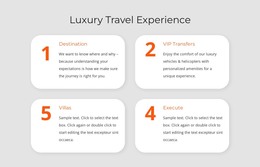
The three-card sequence reads as stable informational content rather than a rotating or expandable component. Each item contains one number and one paragraph, creating a consistent page-content pattern that can explain recruitment steps, staffing information, or job-opportunity guidance. The vertical arrangement controls the reading order, while the bold numbers anchor the eye at the left side of each card. Progressively darker gray backgrounds separate the items visually, and the centered placement leaves generous space around the complete sequence.
For a WordPress-managed site, this block can fit naturally into a permanent services, recruitment, or information page. Its repeated content units can be revised as the surrounding project develops, while the visual pattern keeps the three statements connected. The section can work alongside other page content such as an introduction, service detail, proof, or contact area; it does not need to carry the whole page or define the wider theme.
The black arrow below the final card adds a directional reading cue, suggesting that visitors may continue to another section. It is part of the block's visual progression rather than evidence of a built-in navigation system. Because the interaction is static, the main WordPress-oriented value lies in maintaining a clear, reusable content arrangement: ordered statements, consistent card structure, and restrained tonal differences that support scanning.
Customize with Nicepage
Open this ready-made template in the WordPress Website Builder and customize it visually in the Nicepage editor. Replace demo content, edit page sections, and adapt the design to your project without rebuilding the template from scratch.
Edit Template Offline
2. Create a new page or select existing
3. Click Add new block, search for id 510983 and click enter
Edit Template Online
Create Awesome Websites


Free Nicepage Builder
Keywords
Manage and Edit This Theme in WordPress
Customize and Install the WordPress Theme
Start with this ready-made theme instead of building the WordPress design from scratch. Customize its layout, content, typography, images, sections, and other design elements visually in Nicepage editor, then export and install the WordPress Theme, Plugin, and Pages on your WordPress site. The Nicepage WordPress Plugin lets you continue working with the site after installation.
Edit the Theme Directly in WordPress
After installation, you can edit the WordPress Theme directly in WordPress with the Nicepage WordPress Plugin. Use Site Style to customize site Colors, Fonts, Header, Footer, Blog, and Post Page Templates while working within your WordPress website.
Edit WordPress Pages Visually
Use the Nicepage WordPress Plugin to edit page content directly from the WordPress admin area. Open a WordPress Page with Nicepage and visually change its text, images, sections, and other page elements while continuing to manage the Page through WordPress.
WordPress Content and Theme Integration
Use the customized theme with WordPress Pages, Posts, Blog and Post Templates, menus, widgets, and other CMS-managed content. Shared theme elements such as Colors, Fonts, Header, Footer, Blog, and Post Page Templates can be managed as part of the overall site design, while WordPress provides the CMS environment for managing site content.
This workflow combines a ready-made WordPress Theme with visual customization, direct theme editing in WordPress, and continued content management through the Nicepage WordPress Plugin.