Concert dates WordPress Theme


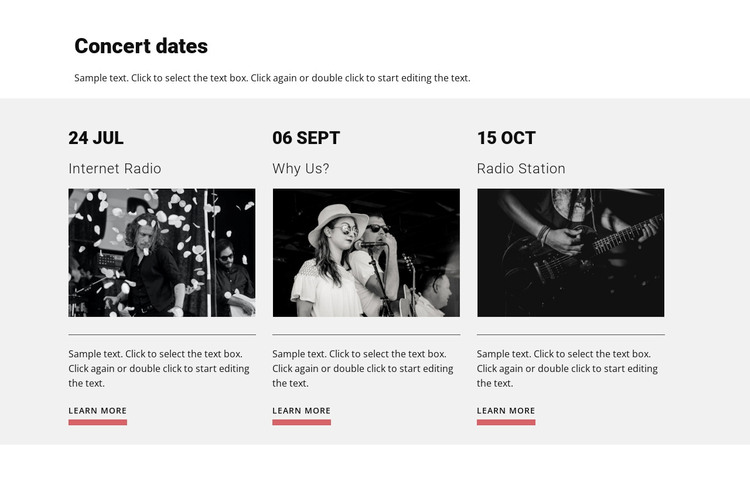
Dated Event Cards Fit Stable WordPress Page Content
The Concert dates heading and supporting paragraph establish a durable subject for the section, while the three repeated cards organize the event information into separate page-content units. Each unit combines a date label, title, image, descriptive text, and Learn more link. The entries marked 24 JUL, 06 SEPT, and 15 OCT, with titles Internet Radio, Why Us?, and Radio Station, can therefore be treated as editable event content within the visual section rather than as one undifferentiated text area.
In a WordPress-managed page or site, this block can provide a stable event or concert-dates region while the surrounding project handles other page content and publishing needs. Its three-column structure gives the section a clear reusable pattern, and the repeated image frames make related entries look consistent. The white heading band separates the introduction from the light gray card field, while black headings and muted gray descriptions create a readable hierarchy. Coral Learn more links offer a consistent route toward additional information without requiring the block to contain a complete event workflow. This interpretation emphasizes page-oriented content: a visitor can understand what the section presents, and a site editor can adapt the dates, titles, images, descriptions, and links as the project changes. The block remains one content section within the broader WordPress theme and site context, not a standalone theme itself.
Customize with Nicepage
Open this ready-made template in the WordPress Website Builder and customize it visually in the Nicepage editor. Replace demo content, edit page sections, and adapt the design to your project without rebuilding the template from scratch.
Edit Template Offline
2. Create a new page or select existing
3. Click Add new block, search for id 431548 and click enter
Edit Template Online
Create Awesome Websites


Free Nicepage Builder
Keywords
Manage and Edit This Theme in WordPress
Customize and Install the WordPress Theme
Start with this ready-made theme instead of building the WordPress design from scratch. Customize its layout, content, typography, images, sections, and other design elements visually in Nicepage editor, then export and install the WordPress Theme, Plugin, and Pages on your WordPress site. The Nicepage WordPress Plugin lets you continue working with the site after installation.
Edit the Theme Directly in WordPress
After installation, you can edit the WordPress Theme directly in WordPress with the Nicepage WordPress Plugin. Use Site Style to customize site Colors, Fonts, Header, Footer, Blog, and Post Page Templates while working within your WordPress website.
Edit WordPress Pages Visually
Use the Nicepage WordPress Plugin to edit page content directly from the WordPress admin area. Open a WordPress Page with Nicepage and visually change its text, images, sections, and other page elements while continuing to manage the Page through WordPress.
WordPress Content and Theme Integration
Use the customized theme with WordPress Pages, Posts, Blog and Post Templates, menus, widgets, and other CMS-managed content. Shared theme elements such as Colors, Fonts, Header, Footer, Blog, and Post Page Templates can be managed as part of the overall site design, while WordPress provides the CMS environment for managing site content.
This workflow combines a ready-made WordPress Theme with visual customization, direct theme editing in WordPress, and continued content management through the Nicepage WordPress Plugin.