Pilates studio WordPress Theme


Stable Pilates Page Content From Hero Message to Benefit Cards
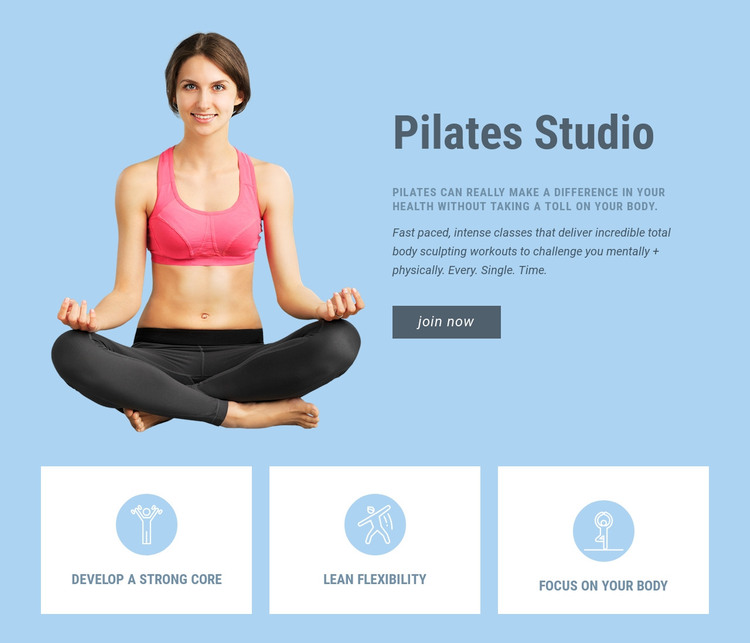
The upper region reads as durable page content rather than a time-sensitive update. “Pilates Studio” names the offering, the adjacent practitioner image supplies visual context, and the supporting statement and workout description explain the section before the Join now button offers a direct next step. In a WordPress-managed project, this arrangement can serve as a stable introductory section on a Pilates or fitness page while the wider site handles other content areas separately.
The three cards add structured content that is easy to keep consistent as the page develops. Each card uses the same visual pattern—white panel, circular icon, and centered label—but carries a different theme: Develop a strong core, Lean flexibility, or Focus on your body. This repeated structure gives the page a compact set of benefit topics without requiring the block to contain detailed class records, schedules, or editorial posts.
The light blue background and dark blue type preserve a clear visual frame around both regions, while the Join now button remains part of the block’s visible participation path. The section can therefore be placed as publishable page content within a broader WordPress-managed site, with related pages or CMS content expanding the offering around it. Nicepage’s WordPress documentation describes working with page content through its WordPress Theme and Plugin workflow, while this block remains one reusable section within that context.
Customize with Nicepage
Open this ready-made template in the WordPress Website Builder and customize it visually in the Nicepage editor. Replace demo content, edit page sections, and adapt the design to your project without rebuilding the template from scratch.
Edit Template Offline
2. Create a new page or select existing
3. Click Add new block, search for id 49985 and click enter
Edit Template Online
Create Awesome Websites


Free Nicepage Builder
Keywords
Manage and Edit This Theme in WordPress
Customize and Install the WordPress Theme
Start with this ready-made theme instead of building the WordPress design from scratch. Customize its layout, content, typography, images, sections, and other design elements visually in Nicepage editor, then export and install the WordPress Theme, Plugin, and Pages on your WordPress site. The Nicepage WordPress Plugin lets you continue working with the site after installation.
Edit the Theme Directly in WordPress
After installation, you can edit the WordPress Theme directly in WordPress with the Nicepage WordPress Plugin. Use Site Style to customize site Colors, Fonts, Header, Footer, Blog, and Post Page Templates while working within your WordPress website.
Edit WordPress Pages Visually
Use the Nicepage WordPress Plugin to edit page content directly from the WordPress admin area. Open a WordPress Page with Nicepage and visually change its text, images, sections, and other page elements while continuing to manage the Page through WordPress.
WordPress Content and Theme Integration
Use the customized theme with WordPress Pages, Posts, Blog and Post Templates, menus, widgets, and other CMS-managed content. Shared theme elements such as Colors, Fonts, Header, Footer, Blog, and Post Page Templates can be managed as part of the overall site design, while WordPress provides the CMS environment for managing site content.
This workflow combines a ready-made WordPress Theme with visual customization, direct theme editing in WordPress, and continued content management through the Nicepage WordPress Plugin.