Plants in the interior WordPress Theme


Bold Cactus Text Creates a Stable Page Introduction
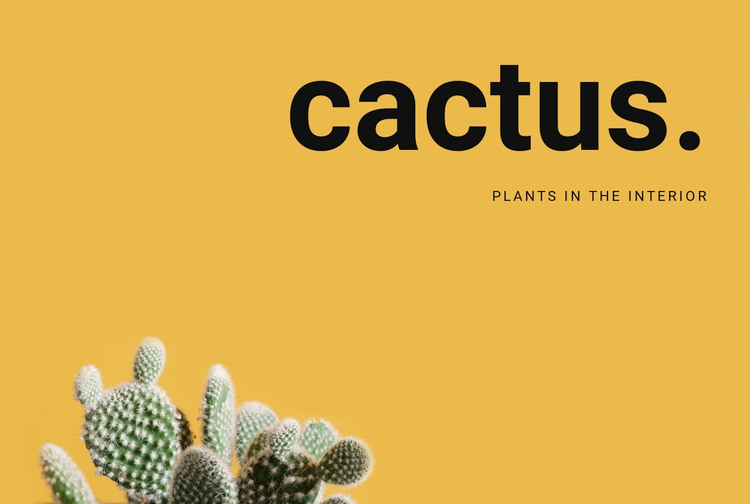
The large heading “cactus.” and the subtitle “Plants in the Interior” give the block a concise, page-oriented introduction. Their upper-right placement leaves the lower portion to the cactus image, creating a visual sequence in which the text names the theme and the photograph reinforces it. On a WordPress-managed page, this arrangement can serve as stable content for an interior-plants section while the surrounding project handles other page material and publishing needs.
The block is especially suited to a permanent introductory area rather than a stream of changing entries. Its content model is deliberately compact: one heading, one supporting subtitle, and one background image. That simplicity makes the section easy to keep visually consistent when used with additional WordPress-managed content about interiors, plant arrangements, or related presentation material. The warm mustard-yellow field provides separation from neighboring sections, and the generous empty space prevents the text from becoming entangled with the cropped cactus image. Since the interaction is static, the section delivers its message immediately without asking visitors to open panels or move through slides. It can therefore anchor the beginning of a page content sequence while remaining clearly one reusable block rather than a complete WordPress Theme.
Customize with Nicepage
Open this ready-made template in the WordPress Website Builder and customize it visually in the Nicepage editor. Replace demo content, edit page sections, and adapt the design to your project without rebuilding the template from scratch.
Edit Template Offline
2. Create a new page or select existing
3. Click Add new block, search for id 44970 and click enter
Edit Template Online
Create Awesome Websites


Free Nicepage Builder
Keywords
Manage and Edit This Theme in WordPress
Customize and Install the WordPress Theme
Start with this ready-made theme instead of building the WordPress design from scratch. Customize its layout, content, typography, images, sections, and other design elements visually in Nicepage editor, then export and install the WordPress Theme, Plugin, and Pages on your WordPress site. The Nicepage WordPress Plugin lets you continue working with the site after installation.
Edit the Theme Directly in WordPress
After installation, you can edit the WordPress Theme directly in WordPress with the Nicepage WordPress Plugin. Use Site Style to customize site Colors, Fonts, Header, Footer, Blog, and Post Page Templates while working within your WordPress website.
Edit WordPress Pages Visually
Use the Nicepage WordPress Plugin to edit page content directly from the WordPress admin area. Open a WordPress Page with Nicepage and visually change its text, images, sections, and other page elements while continuing to manage the Page through WordPress.
WordPress Content and Theme Integration
Use the customized theme with WordPress Pages, Posts, Blog and Post Templates, menus, widgets, and other CMS-managed content. Shared theme elements such as Colors, Fonts, Header, Footer, Blog, and Post Page Templates can be managed as part of the overall site design, while WordPress provides the CMS environment for managing site content.
This workflow combines a ready-made WordPress Theme with visual customization, direct theme editing in WordPress, and continued content management through the Nicepage WordPress Plugin.