Running challenges WordPress Theme


Stable Program Content With Four Publishable Information Units
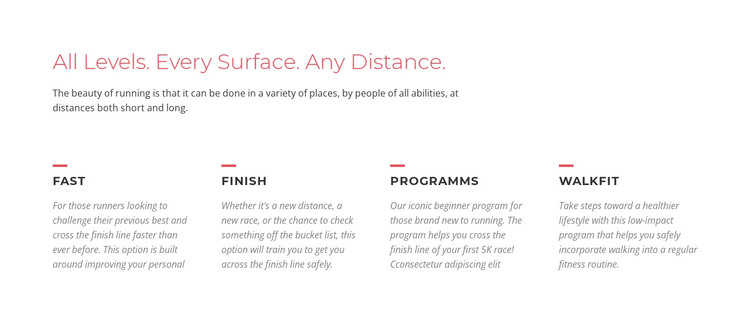
The introductory heading and paragraph establish the block as a durable information area rather than a time-sensitive feed. Beneath them, the four labeled units separate the available directions: FAST speaks to runners seeking a better previous time, FINISH to a new distance, race, or personal goal, Programms to beginners moving toward a first 5K, and WALKFIT to lower-impact walking and fitness. Each unit uses the same red rule, uppercase label, and descriptive text pattern, which keeps the content visually consistent while preserving different meanings.
In a WordPress-managed page, this structure can work as a stable services or programs section within the surrounding site. The wider project can maintain related pages and other content around it, while this block continues to present the core categories in a compact format. The dark gray typography and muted italic descriptions support reading, and the generous gaps prevent the four choices from merging into one dense paragraph. The section can therefore retain its visual role as publishable page content while editors or site owners manage the broader project elsewhere. Its WordPress-oriented value comes from presenting enduring program information as a coherent page region, not from turning the block itself into a complete theme or site.
Customize with Nicepage
Open this ready-made template in the WordPress Website Builder and customize it visually in the Nicepage editor. Replace demo content, edit page sections, and adapt the design to your project without rebuilding the template from scratch.
Edit Template Offline
2. Create a new page or select existing
3. Click Add new block, search for id 44102 and click enter
Edit Template Online
Create Awesome Websites


Free Nicepage Builder
Keywords
Manage and Edit This Theme in WordPress
Customize and Install the WordPress Theme
Start with this ready-made theme instead of building the WordPress design from scratch. Customize its layout, content, typography, images, sections, and other design elements visually in Nicepage editor, then export and install the WordPress Theme, Plugin, and Pages on your WordPress site. The Nicepage WordPress Plugin lets you continue working with the site after installation.
Edit the Theme Directly in WordPress
After installation, you can edit the WordPress Theme directly in WordPress with the Nicepage WordPress Plugin. Use Site Style to customize site Colors, Fonts, Header, Footer, Blog, and Post Page Templates while working within your WordPress website.
Edit WordPress Pages Visually
Use the Nicepage WordPress Plugin to edit page content directly from the WordPress admin area. Open a WordPress Page with Nicepage and visually change its text, images, sections, and other page elements while continuing to manage the Page through WordPress.
WordPress Content and Theme Integration
Use the customized theme with WordPress Pages, Posts, Blog and Post Templates, menus, widgets, and other CMS-managed content. Shared theme elements such as Colors, Fonts, Header, Footer, Blog, and Post Page Templates can be managed as part of the overall site design, while WordPress provides the CMS environment for managing site content.
This workflow combines a ready-made WordPress Theme with visual customization, direct theme editing in WordPress, and continued content management through the Nicepage WordPress Plugin.