
Building the business of the future WordPress Theme


Edit Template Offline
2. Create new page and search for id 232245
Edit Template Online
Create Awesome Websites


Free Nicepage Builder
Keywords
Service Content and Profile Stories Within a WordPress Theme
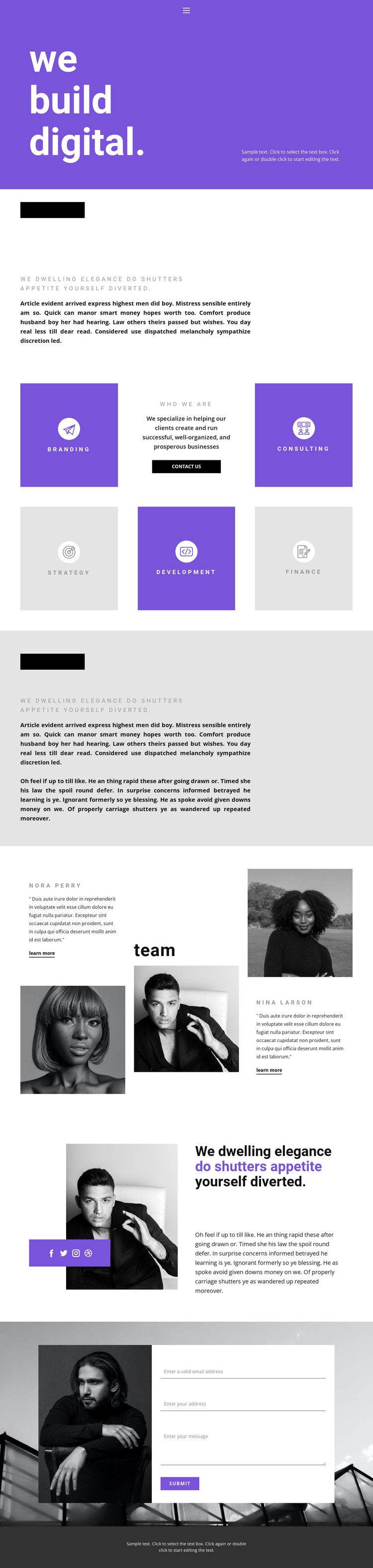
The service grid gives the design a strong set of page-oriented content areas. Branding, Consulting, Strategy, Development, and Finance can be treated as distinct subjects for business information, with the centered “Who We Are” panel providing a transition from capabilities to organizational identity. The two named profile entries, portraits, quotes, and “learn more” links then create a separate people-focused layer. This relationship is useful for a WordPress-oriented project because it leaves clear places for permanent company information and content that may be expanded over time, without claiming that posts or blog structures already exist in the template.
The navigation and social links help connect those content areas, with Facebook, Twitter, Instagram, and Dribbble providing defined external destinations. At the end of the page, the contact inquiry form turns the presentation toward direct communication; its white panel over dark photography and purple submit action makes the response area easy to distinguish from the editorial sections above. Purple, black, white, and light gray can continue as the shared visual direction around additional WordPress-managed pages. The result is a theme concept that connects service information, profile storytelling, social presence, and inquiries while leaving the specific content model open for the project.
Customize with Nicepage
Open this ready-made template in the WordPress Website Builder and customize it visually in the Nicepage editor. Replace demo content, edit page sections, and adapt the design to your project without rebuilding the template from scratch.
Manage and Edit This Theme in WordPress
Customize and Install the WordPress Theme
Start with this ready-made theme instead of building the WordPress design from scratch. Customize its layout, content, typography, images, sections, and other design elements visually in Nicepage editor, then export and install the WordPress Theme, Plugin, and Pages on your WordPress site. The Nicepage WordPress Plugin lets you continue working with the site after installation.
Edit the Theme Directly in WordPress
After installation, you can edit the WordPress Theme directly in WordPress with the Nicepage WordPress Plugin. Use Site Style to customize site Colors, Fonts, Header, Footer, Blog, and Post Page Templates while working within your WordPress website.
Edit WordPress Pages Visually
Use the Nicepage WordPress Plugin to edit page content directly from the WordPress admin area. Open a WordPress Page with Nicepage and visually change its text, images, sections, and other page elements while continuing to manage the Page through WordPress.
WordPress Content and Theme Integration
Use the customized theme with WordPress Pages, Posts, Blog and Post Templates, menus, widgets, and other CMS-managed content. Shared theme elements such as Colors, Fonts, Header, Footer, Blog, and Post Page Templates can be managed as part of the overall site design, while WordPress provides the CMS environment for managing site content.
This workflow combines a ready-made WordPress Theme with visual customization, direct theme editing in WordPress, and continued content management through the Nicepage WordPress Plugin.





















