
Brands WordPress Theme


Edit Template Offline
2. Create new page and search for id 18610
Edit Template Online
Create Awesome Websites


Free Nicepage Builder
Keywords
Portfolio Content and Capability Areas for a WordPress Theme
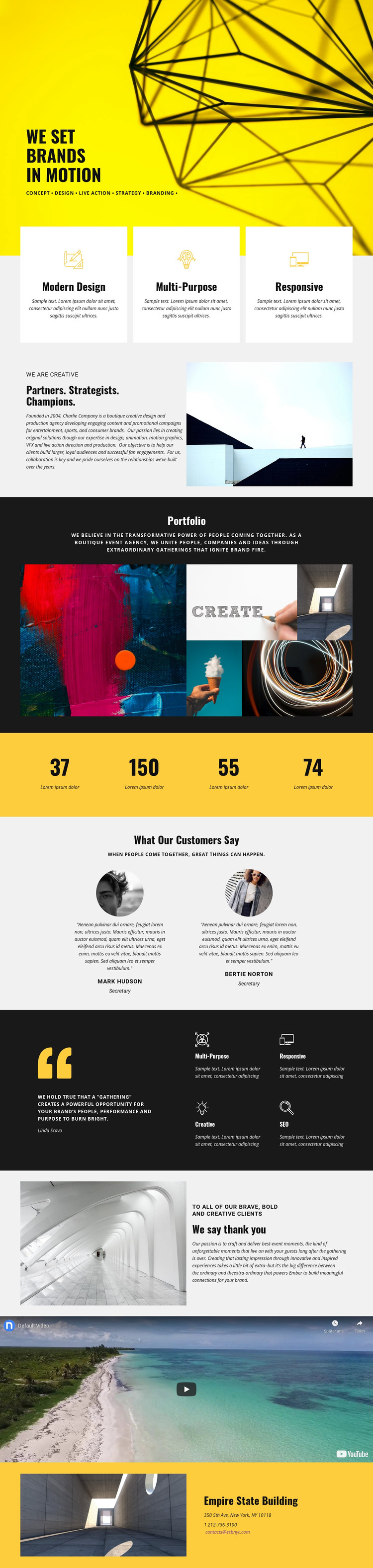
The opening statement and capability labels establish clear page-oriented content for a creative agency: concept, design, live action, strategy, and branding appear before the more detailed agency narrative. In a WordPress-managed project, these areas can remain the permanent presentation of the organization, while their wording and imagery are updated as the offer develops. The three white capability cards also create a repeatable visual pattern for summarizing services without making unsupported claims about specific WordPress content types already being present.
The portfolio section gives the design a separate work-sample focus through one large image and four smaller images. That visual collection can support project or campaign content as the site grows, while the two testimonial profiles provide a distinct customer-proof area. The full-width promotional video adds a media-led explanation of the agency experience, and the “We Say Thank You” section connects that experience with event-oriented brand relationships. These areas create a useful separation between service information, visual work, supporting voices, and motion content.
The closing contact panel supplies a practical page destination with address, phone, and email details, although the displayed values should be replaced or verified before publication. Together, the page’s permanent agency information and repeatable content areas give a WordPress theme a coherent base for maintaining creative work and client-facing updates within one visual system.
Customize with Nicepage
Open this ready-made template in the WordPress Website Builder and customize it visually in the Nicepage editor. Replace demo content, edit page sections, and adapt the design to your project without rebuilding the template from scratch.
Manage and Edit This Theme in WordPress
Customize and Install the WordPress Theme
Start with this ready-made theme instead of building the WordPress design from scratch. Customize its layout, content, typography, images, sections, and other design elements visually in Nicepage editor, then export and install the WordPress Theme, Plugin, and Pages on your WordPress site. The Nicepage WordPress Plugin lets you continue working with the site after installation.
Edit the Theme Directly in WordPress
After installation, you can edit the WordPress Theme directly in WordPress with the Nicepage WordPress Plugin. Use Site Style to customize site Colors, Fonts, Header, Footer, Blog, and Post Page Templates while working within your WordPress website.
Edit WordPress Pages Visually
Use the Nicepage WordPress Plugin to edit page content directly from the WordPress admin area. Open a WordPress Page with Nicepage and visually change its text, images, sections, and other page elements while continuing to manage the Page through WordPress.
WordPress Content and Theme Integration
Use the customized theme with WordPress Pages, Posts, Blog and Post Templates, menus, widgets, and other CMS-managed content. Shared theme elements such as Colors, Fonts, Header, Footer, Blog, and Post Page Templates can be managed as part of the overall site design, while WordPress provides the CMS environment for managing site content.
This workflow combines a ready-made WordPress Theme with visual customization, direct theme editing in WordPress, and continued content management through the Nicepage WordPress Plugin.





















