
Creative Photography WordPress Theme


Edit Template Offline
2. Create new page and search for id 18348
Edit Template Online
Create Awesome Websites


Free Nicepage Builder
Keywords
Portfolio Stories and Personal Pages Fit a Visual Content Structure
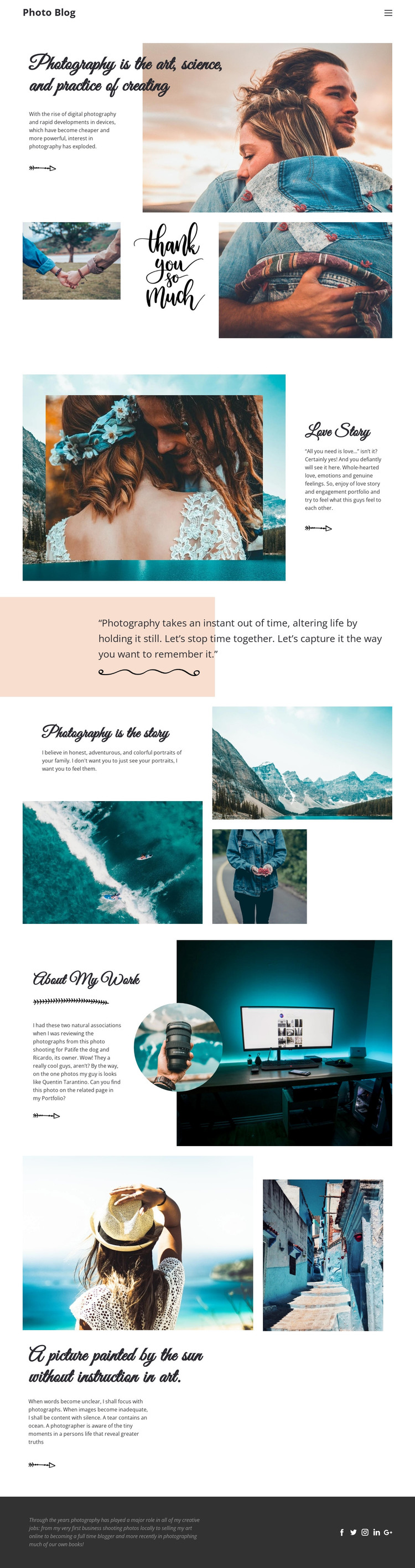
The opening photography statement, Love Story feature, and About My Work section create different kinds of permanent page content within the same visual system. The introduction can establish the photographer’s subject and point of view, while Love Story presents a focused engagement and romance portfolio theme through an image-and-text relationship. About My Work shifts toward personal context, combining narrative copy with a large desk photograph and circular inset portrait.
The image collages support another content role. The compact three-image arrangement can provide a concise visual preview, while the larger collage around Photography is the story gives the photographer room to connect landscape, shoreline or aerial, and portrait images with a personal statement. The closing reflection extends the editorial side of the design. Together, these areas can accommodate changing photography stories without losing the page’s recognizable headings, spacing, image treatment, and color direction.
The social footer provides shared site content through links for Facebook, Twitter, Instagram, LinkedIn, and Google, giving the project a consistent closing region across related pages. This makes the design suitable for a WordPress-managed content environment where permanent photography pages and regularly refreshed stories could remain visually coordinated. The template analysis does not verify existing Posts, categories, or blog structures, so the interpretation concerns how the confirmed content areas can work with WordPress rather than claiming that those CMS elements are already present.
Customize with Nicepage
Open this ready-made template in the WordPress Website Builder and customize it visually in the Nicepage editor. Replace demo content, edit page sections, and adapt the design to your project without rebuilding the template from scratch.
Manage and Edit This Theme in WordPress
Customize and Install the WordPress Theme
Start with this ready-made theme instead of building the WordPress design from scratch. Customize its layout, content, typography, images, sections, and other design elements visually in Nicepage editor, then export and install the WordPress Theme, Plugin, and Pages on your WordPress site. The Nicepage WordPress Plugin lets you continue working with the site after installation.
Edit the Theme Directly in WordPress
After installation, you can edit the WordPress Theme directly in WordPress with the Nicepage WordPress Plugin. Use Site Style to customize site Colors, Fonts, Header, Footer, Blog, and Post Page Templates while working within your WordPress website.
Edit WordPress Pages Visually
Use the Nicepage WordPress Plugin to edit page content directly from the WordPress admin area. Open a WordPress Page with Nicepage and visually change its text, images, sections, and other page elements while continuing to manage the Page through WordPress.
WordPress Content and Theme Integration
Use the customized theme with WordPress Pages, Posts, Blog and Post Templates, menus, widgets, and other CMS-managed content. Shared theme elements such as Colors, Fonts, Header, Footer, Blog, and Post Page Templates can be managed as part of the overall site design, while WordPress provides the CMS environment for managing site content.
This workflow combines a ready-made WordPress Theme with visual customization, direct theme editing in WordPress, and continued content management through the Nicepage WordPress Plugin.





















