
Art Studio WordPress Theme


Edit Template Offline
2. Create new page and search for id 14090
Edit Template Online
Create Awesome Websites


Free Nicepage Builder
Keywords
Editorial Features Give WordPress Content a Consistent Visual Context
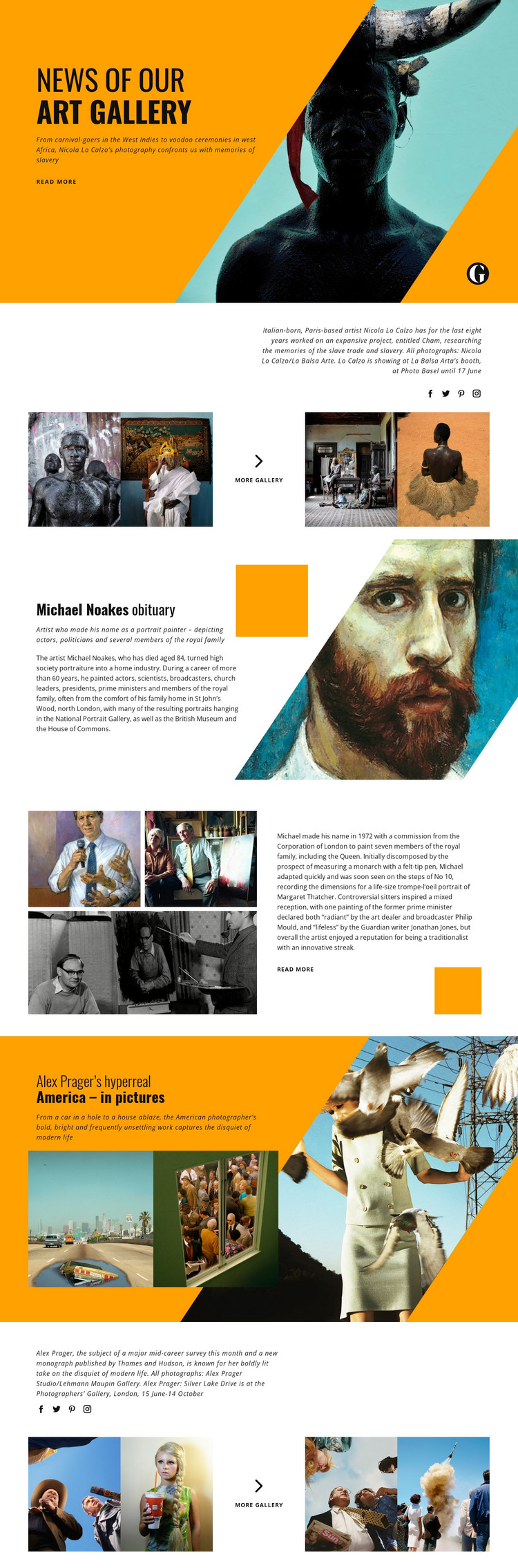
The page divides its material into content areas that suit a publication-oriented site without claiming that specific WordPress posts or categories already exist. The Nicola Lo Calzo feature is a useful example: a caption introduces the subject, four photographs provide visual context, and a centered “More Gallery” link creates a natural continuation for related visual content. Social links complete that story area without changing its editorial emphasis.
The Michael Noakes material supplies a different content relationship. The obituary headline and portrait-oriented image establish a focused article presentation, while the following split section extends the profile with three supporting photographs, a longer excerpt, and a “Read More” action. This separation can help permanent page content and regularly updated stories retain a shared visual direction while serving different reading purposes. The Alex Prager feature then adds another photography-led story with two images and a later four-image gallery pattern.
For a WordPress-oriented project, the important value is not the presence of an unverified blog structure but the clear organization of editorial subjects, image-led features, and continuation points. The recurring combination of headline, concise summary, photography, and onward link can support gallery news, artist profiles, cultural commentary, or portraiture as the site’s content grows. The high-contrast type and orange-and-teal image fields provide a consistent theme character, while the varied section layouts leave room for different story lengths and visual subjects.
Customize with Nicepage
Open this ready-made template in the WordPress Website Builder and customize it visually in the Nicepage editor. Replace demo content, edit page sections, and adapt the design to your project without rebuilding the template from scratch.
Manage and Edit This Theme in WordPress
Customize and Install the WordPress Theme
Start with this ready-made theme instead of building the WordPress design from scratch. Customize its layout, content, typography, images, sections, and other design elements visually in Nicepage editor, then export and install the WordPress Theme, Plugin, and Pages on your WordPress site. The Nicepage WordPress Plugin lets you continue working with the site after installation.
Edit the Theme Directly in WordPress
After installation, you can edit the WordPress Theme directly in WordPress with the Nicepage WordPress Plugin. Use Site Style to customize site Colors, Fonts, Header, Footer, Blog, and Post Page Templates while working within your WordPress website.
Edit WordPress Pages Visually
Use the Nicepage WordPress Plugin to edit page content directly from the WordPress admin area. Open a WordPress Page with Nicepage and visually change its text, images, sections, and other page elements while continuing to manage the Page through WordPress.
WordPress Content and Theme Integration
Use the customized theme with WordPress Pages, Posts, Blog and Post Templates, menus, widgets, and other CMS-managed content. Shared theme elements such as Colors, Fonts, Header, Footer, Blog, and Post Page Templates can be managed as part of the overall site design, while WordPress provides the CMS environment for managing site content.
This workflow combines a ready-made WordPress Theme with visual customization, direct theme editing in WordPress, and continued content management through the Nicepage WordPress Plugin.





















