
Illustration styles for art WordPress Theme


Edit Template Offline
2. Create new page and search for id 103312
Edit Template Online
Create Awesome Websites


Free Nicepage Builder
Keywords
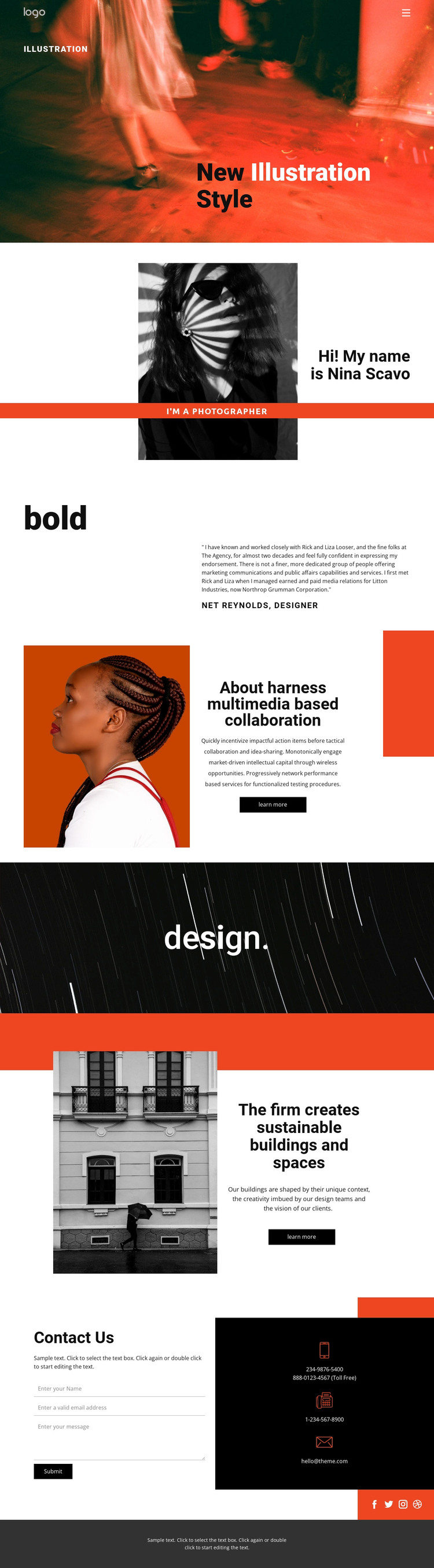
A portrait-led introduction connects visual work with WordPress page content
The portrait, photographer label, and opening “New Illustration Style” statement give the design a strong page-oriented identity before the visitor reaches the supporting sections. That beginning can anchor a WordPress-managed presentation around the person or studio behind the creative work, while the attributed endorsement adds a distinct proof area rather than repeating the introduction. The two image-and-text panels extend the story in different directions: one explains collaboration-related content, and the other presents a building and spaces capability beside a large photograph and a learn-more action.
The contact region creates a clear permanent page destination. A form is paired with phone and email details, while Facebook, Twitter, Instagram, and Dribbble links connect the main presentation with external profile channels. This mix gives WordPress content a defined relationship between introductory information, visual examples, supporting credibility, capability statements, and inquiry content. The design can therefore accommodate page-based creative information while leaving room for future editorial or project material to use the same visual direction, without claiming that posts, categories, or blog structures are already present. Its strongest theme interpretation is the continuity between a recognizable personal identity and a contact-ready portfolio layout.
Customize with Nicepage
Open this ready-made template in the WordPress Website Builder and customize it visually in the Nicepage editor. Replace demo content, edit page sections, and adapt the design to your project without rebuilding the template from scratch.
Manage and Edit This Theme in WordPress
Customize and Install the WordPress Theme
Start with this ready-made theme instead of building the WordPress design from scratch. Customize its layout, content, typography, images, sections, and other design elements visually in Nicepage editor, then export and install the WordPress Theme, Plugin, and Pages on your WordPress site. The Nicepage WordPress Plugin lets you continue working with the site after installation.
Edit the Theme Directly in WordPress
After installation, you can edit the WordPress Theme directly in WordPress with the Nicepage WordPress Plugin. Use Site Style to customize site Colors, Fonts, Header, Footer, Blog, and Post Page Templates while working within your WordPress website.
Edit WordPress Pages Visually
Use the Nicepage WordPress Plugin to edit page content directly from the WordPress admin area. Open a WordPress Page with Nicepage and visually change its text, images, sections, and other page elements while continuing to manage the Page through WordPress.
WordPress Content and Theme Integration
Use the customized theme with WordPress Pages, Posts, Blog and Post Templates, menus, widgets, and other CMS-managed content. Shared theme elements such as Colors, Fonts, Header, Footer, Blog, and Post Page Templates can be managed as part of the overall site design, while WordPress provides the CMS environment for managing site content.
This workflow combines a ready-made WordPress Theme with visual customization, direct theme editing in WordPress, and continued content management through the Nicepage WordPress Plugin.





















