First Human On Mars Template


Edit Template Offline
2. Create new page and search for id 14292
Edit Template Online
Create Awesome Websites


Free Nicepage Builder
Keywords
Mars Exploration Is Carried by Images and Linked Story Previews
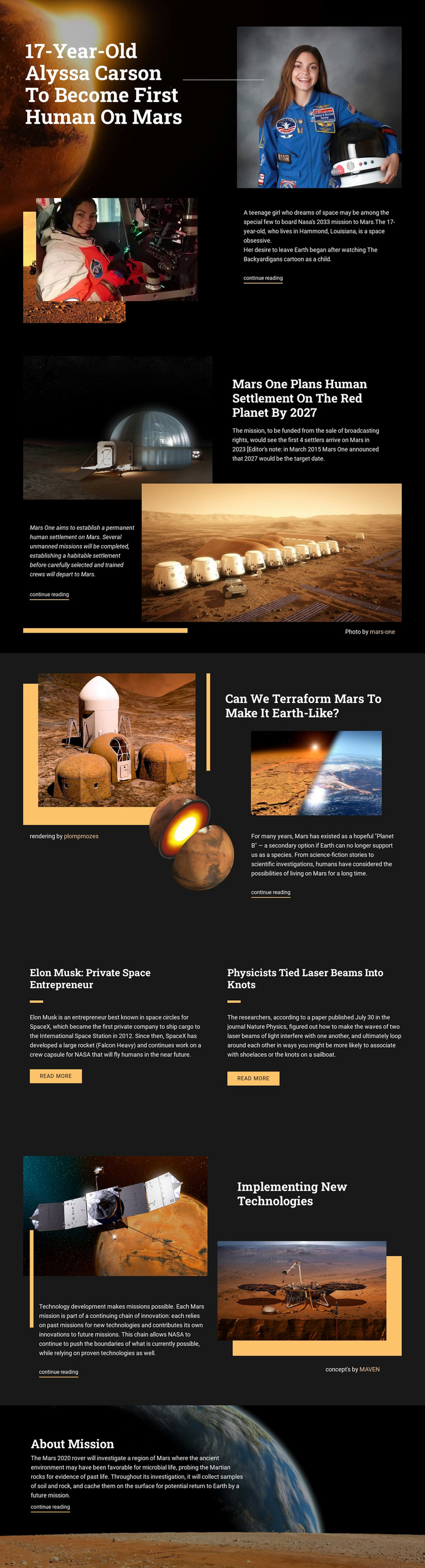
Large Mars photography, compact article introductions, and repeated reading actions make this design a distinctive option for projects that need visual storytelling around science and exploration. The Alyssa Carson opening feature immediately combines a human subject with Mars imagery, while the Mars One and terraforming sections broaden the editorial range through settlement and planetary science. These topics create stronger differentiation than a generic technology layout centered only on services or product cards.
The two-item feature group adds useful variety without breaking the publication character. Its matching panels present Elon Musk’s private-space subject and the laser-beam research story as parallel editorial choices, each supported by a summary and read-more button. The later technology section connects spacecraft imagery with mission innovation, and the closing Mars 2020 feature returns to a large atmospheric image and a focused text panel. Together, the sections cover people, proposals, scientific questions, technology, and missions.
That coverage makes the template worth choosing when a project needs a ready-made design for linked stories rather than a single dense article. The dark background and orange accents keep the varied subjects under one recognizable visual direction, while the repeated content pattern leaves room to replace the sample topics with verified editorial material of similar structure.
Customize with Nicepage
Open this ready-made template in the Template Builder and customize it visually in the Nicepage editor. Replace demo content, edit page sections, and adapt the design to your project without rebuilding the template from scratch.
Start With a Ready-Made Template
Choose a Design for a New Page
Use a ready-made template as a starting point instead of creating every page from a blank canvas. When adding a new page in Nicepage, browse available designs, compare different layouts, and choose an option that already fits the general purpose and visual direction of your project.
Browse Different Page Designs
Explore Page Designs using search, thematic categories, Design Sets, and full-page previews. The collection includes layouts for different subjects and page purposes, making it easier to compare alternatives before selecting a design to customize.
Customize the Selected Template
After choosing a design, create the page and continue editing it visually in Nicepage. Replace the demo content, adjust images, typography, colors, sections, and other elements, and adapt the ready-made layout to your own content instead of rebuilding the design from the beginning.
Explore More Design Directions
If the first option does not match your project closely enough, return to the design collection and compare other templates before committing to a layout. This makes the template library useful not only for faster page creation, but also for exploring different visual approaches and finding a suitable starting point for a new project.
This workflow gives you access to a broad collection of ready-made designs that can be selected, compared, and customized according to the needs of each new page or project.