Crypto Trading & Investment Template



Edit Template Offline
2. Create new page and search for id 6631347
Edit Template Online
Create Awesome Websites


Free Nicepage Builder
Keywords
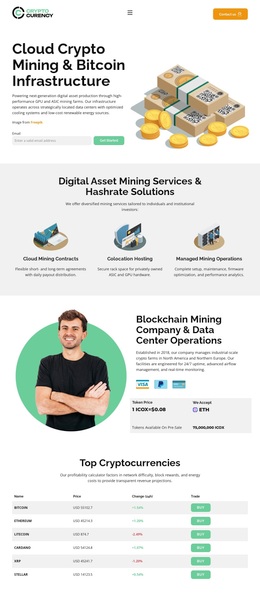
Four Service Categories Give the Crypto Story Clear Coverage
The four named service categories make this design a useful option for projects that need to explain more than one digital-asset offering. Managed Crypto Portfolios, Automated Trading Strategies, Staking and Passive Income, and Private Investment Advisory are presented as a related group, so the page can introduce a broad investment proposition without losing the distinction between service types. The coin imagery reinforces the subject visually, while the dark navy, cyan, orange, and gold palette gives the presentation a recognizable technology-and-finance direction.
The design also covers the questions that commonly follow an initial offer. A security-focused blockchain section adds explanatory context, and the four numbered cards show a simple path from account creation through performance tracking, wallet funding, and withdrawals. Three testimonial cards introduce an investor-oriented proof section, while the performance area supplies a separate place for market and investment figures. These sections create a fuller content story than a layout built around only one hero and one call to action.
The closing invitation returns to “Get Started Now” and “Contact Us,” connecting the page’s varied content back to a practical next step. This combination of service coverage, process explanation, supporting stories, and direct actions makes the design worth considering when a crypto investment project needs a focused presentation with enough structure to explain its offer clearly.
Customize with Nicepage
Open this ready-made template in the Template Builder and customize it visually in the Nicepage editor. Replace demo content, edit page sections, and adapt the design to your project without rebuilding the template from scratch.
Start With a Ready-Made Template
Choose a Design for a New Page
Use a ready-made template as a starting point instead of creating every page from a blank canvas. When adding a new page in Nicepage, browse available designs, compare different layouts, and choose an option that already fits the general purpose and visual direction of your project.
Browse Different Page Designs
Explore Page Designs using search, thematic categories, Design Sets, and full-page previews. The collection includes layouts for different subjects and page purposes, making it easier to compare alternatives before selecting a design to customize.
Customize the Selected Template
After choosing a design, create the page and continue editing it visually in Nicepage. Replace the demo content, adjust images, typography, colors, sections, and other elements, and adapt the ready-made layout to your own content instead of rebuilding the design from the beginning.
Explore More Design Directions
If the first option does not match your project closely enough, return to the design collection and compare other templates before committing to a layout. This makes the template library useful not only for faster page creation, but also for exploring different visual approaches and finding a suitable starting point for a new project.
This workflow gives you access to a broad collection of ready-made designs that can be selected, compared, and customized according to the needs of each new page or project.