Interior design excellence Template


Alternating rows give the values section a stronger visual rhythm than a simple text stack
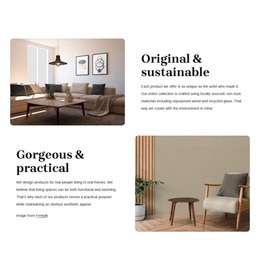
The block stands out through the combination of two focused value statements and an opposing image-text pattern. The first row presents “Original & sustainable” beside a rounded interior photograph, allowing the discussion of locally sourced, non-toxic materials, repurposed wood, and recycled glass to begin with visual context. The second row changes the emphasis to “Gorgeous & practical,” pairing its explanation of usefulness and aesthetic appeal with a furniture image on the opposite side.
That reversal is a practical reason to choose this design when a project needs more movement than a centered text column or a uniform card grid. Visitors encounter a new alignment in the second row, but the repeated rounded corners, warm neutral palette, black serif headings, and compact sans-serif copy keep the two ideas connected. Generous white space prevents the alternating structure from becoming visually crowded, while strong text-image contrast supports quick scanning.
The result is especially suited to a section that must explain principles rather than merely display products. It can introduce a furnishings brand’s approach through materials, originality, usability, and appearance in one contained arrangement. Other section designs may offer more repeated items or stronger interaction; this option is distinguished by its two-row narrative rhythm and the way each image reinforces a specific statement.
Customize with Nicepage
Open this ready-made template in the Template Builder and customize it visually in the Nicepage editor. Replace demo content, edit page sections, and adapt the design to your project without rebuilding the template from scratch.
Edit Template Offline
2. Create a new page or select existing
3. Click Add new block, search for id 6276481 and click enter
Edit Template Online
Create Awesome Websites


Free Nicepage Builder
Keywords
Start With a Ready-Made Template
Choose a Design for a New Page
Use a ready-made template as a starting point instead of creating every page from a blank canvas. When adding a new page in Nicepage, browse available designs, compare different layouts, and choose an option that already fits the general purpose and visual direction of your project.
Browse Different Page Designs
Explore Page Designs using search, thematic categories, Design Sets, and full-page previews. The collection includes layouts for different subjects and page purposes, making it easier to compare alternatives before selecting a design to customize.
Customize the Selected Template
After choosing a design, create the page and continue editing it visually in Nicepage. Replace the demo content, adjust images, typography, colors, sections, and other elements, and adapt the ready-made layout to your own content instead of rebuilding the design from the beginning.
Explore More Design Directions
If the first option does not match your project closely enough, return to the design collection and compare other templates before committing to a layout. This makes the template library useful not only for faster page creation, but also for exploring different visual approaches and finding a suitable starting point for a new project.
This workflow gives you access to a broad collection of ready-made designs that can be selected, compared, and customized according to the needs of each new page or project.