Architecture city guide Template


Edit Template Offline
2. Create new page and search for id 27321
Edit Template Online
Create Awesome Websites


Free Nicepage Builder
Keywords
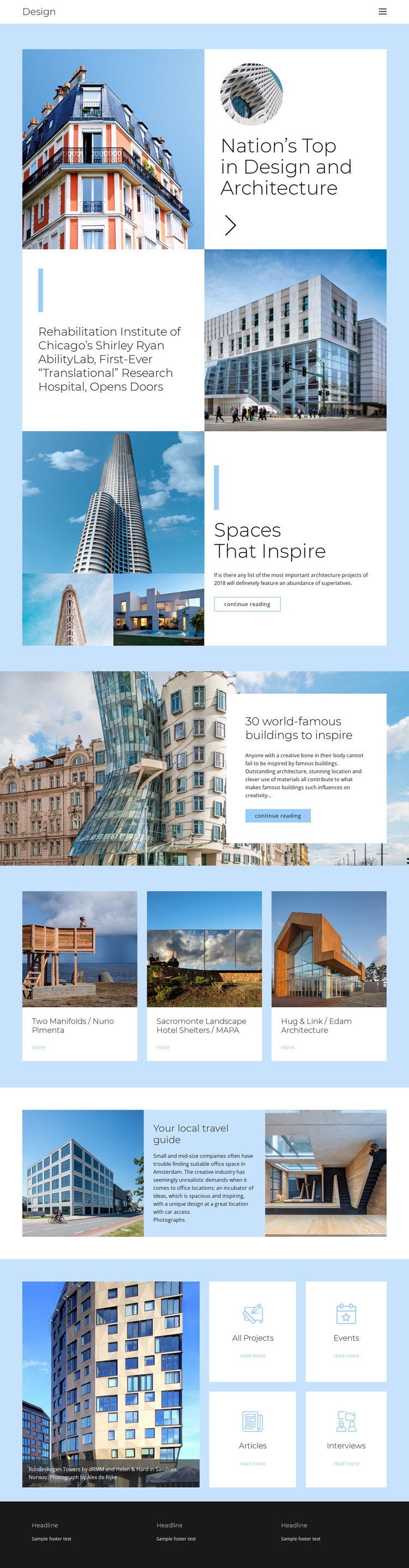
Editorial Photography and Named Projects Make This Design Easy to Recognize
Large architectural photographs carry much of the page’s identity, but they are consistently paired with editorial context rather than displayed as isolated decoration. The opening split feature places a building image beside a white text panel and circular supporting photograph, establishing a magazine-like approach from the first content section. That approach continues with the Shirley Ryan AbilityLab story and the Spaces That Inspire feature, where image groupings support reading about architecture and design.
The project gallery gives the design a particularly useful point of distinction. Instead of relying only on generic service cards, it names Two Manifolds by Nuno Pimenta, Sacromonte Landscape Hotel Shelters by MAPA, and Hug & Link by Edam Architecture as repeated visual references. The full-width article about 30 world-famous buildings adds another image-led editorial route, while the Your local travel guide section connects an exterior photograph, centered text, and interior image in a compact narrative composition. Four category tiles then broaden the possible content direction through All Projects, Events, Articles, and Interviews. These relationships make the template a strong option for projects that need to present architecture as a combination of visual research, project discovery, and continued reading. Its value comes from content coverage and editorial rhythm, not from a single isolated hero section or a purely corporate card layout.
Customize with Nicepage
Open this ready-made template in the Template Builder and customize it visually in the Nicepage editor. Replace demo content, edit page sections, and adapt the design to your project without rebuilding the template from scratch.
Start With a Ready-Made Template
Choose a Design for a New Page
Use a ready-made template as a starting point instead of creating every page from a blank canvas. When adding a new page in Nicepage, browse available designs, compare different layouts, and choose an option that already fits the general purpose and visual direction of your project.
Browse Different Page Designs
Explore Page Designs using search, thematic categories, Design Sets, and full-page previews. The collection includes layouts for different subjects and page purposes, making it easier to compare alternatives before selecting a design to customize.
Customize the Selected Template
After choosing a design, create the page and continue editing it visually in Nicepage. Replace the demo content, adjust images, typography, colors, sections, and other elements, and adapt the ready-made layout to your own content instead of rebuilding the design from the beginning.
Explore More Design Directions
If the first option does not match your project closely enough, return to the design collection and compare other templates before committing to a layout. This makes the template library useful not only for faster page creation, but also for exploring different visual approaches and finding a suitable starting point for a new project.
This workflow gives you access to a broad collection of ready-made designs that can be selected, compared, and customized according to the needs of each new page or project.