
The block layout is essential on modern websites, and you can learn to use Blocks in the Nicepage Applications, WordPress Plugin, Joomla Extension, and Online Editor.
Add Block
You can add a Block from the Add Panel. You can add a Blank, Preset, Design, and AI-generated Block.

Block Presets And Designs
You can use Block Presets or Designs grouped by their functions, such as Text on Image, Contact Form, Contacts, Video, and many others.

Over 15,000 block designs are also available. The Block thumbnails are readable on large screens and support Retina for Mac. They are also helpful for Windows computers, using more than 100% zoom.
You can also use the AI-Powered Block Builder.
Search In Block Designs
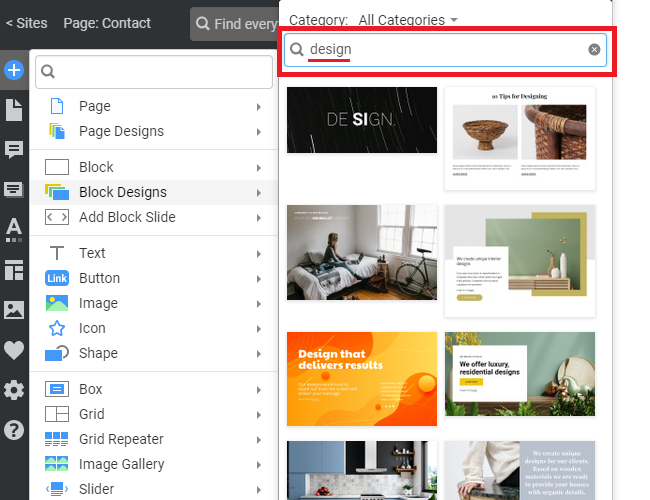
You can use the Search to find Block Designs and select the Thematic Category.
Block Properties
You can change the Block Properties in the Property Panel.
Block Width And Height
Modify the Block Width and Height options.

You can choose the Width and Height presets from the lists.

Block Margins
The Block Margins are presented as informative icons.

Image Background Crop & Zoom
You can use the Crop & Zoom properties for the Image Background.

Image Background Shade
You can also easily add and remove the Shade for the Image Background, which makes the text content more contrasted and, therefore, more readable.

Block Import
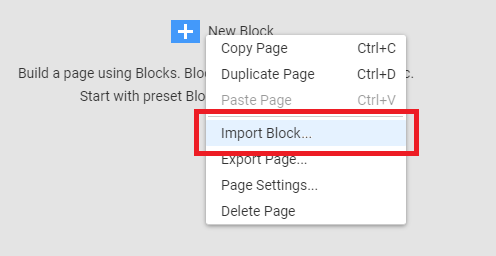
When there are no blocks on the page, you can use the Import Block operation from the Page's Context Menu to import a block without adding an extra block.
Screen-Wide Block Spacing
Wide site designs are gaining popularity. Therefore, there is a need to add spacing to align the elements to the screen lines, while maintaining some spacing at the same time.
To implement this, we have added the Left and Right Spacing properties for the Block per multiple user requests, which you can set for the screen-wide blocks.
