Easy chocolate cake recipes Template

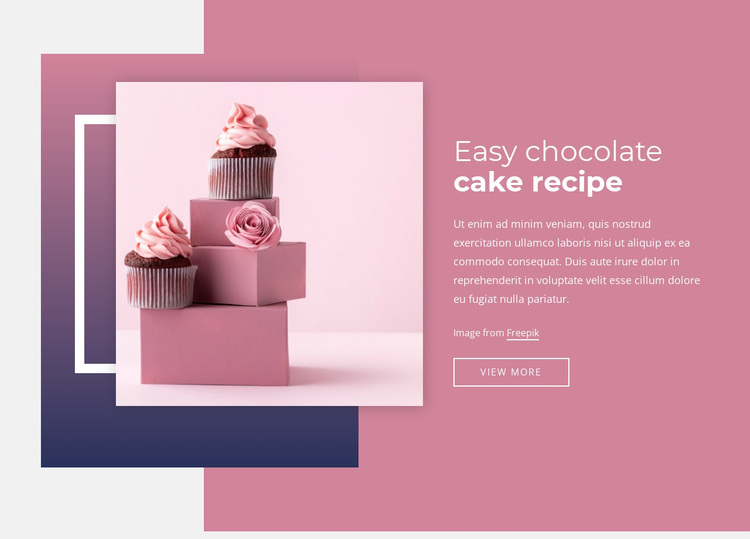
A large dessert photograph, a focused recipe heading, and a single continuation action make this block a distinctive ready-made section choice. The image shows pink cupcakes and a cake on the left, layered with geometric rectangular accents and a white outlined frame. On the right, “Easy chocolate cake recipe” is paired with a supporting paragraph, image credit, and “VIEW MORE” button. The split composition keeps the featured food visually prominent while preserving a compact information column. Pink, mauve, and dark blue-purple accents give the section a recognizable celebration-oriented direction.
ID : 236868   |   Category : Food & Restaurant, Shapes

A Recipe Introduction With Image-Led Contrast

The block combines a large, carefully framed dessert photograph with a compact text-and-action column, making its design choice easy to distinguish from a conventional card grid or text-only recipe section. Pink cupcakes and a cake arranged on pink boxes supply the visual subject, while the heading “Easy chocolate cake recipe” tells visitors exactly what the featured content concerns. The supporting paragraph and image credit add context without competing with the photograph, and “VIEW MORE” gives the arrangement a clear continuation point.

The overlapping image composition is another reason to choose this section. Geometric rectangular accents and a white outlined rectangle create layers around the image, so the food photography becomes part of the design rather than a detached illustration. On the opposite side, white left-aligned text sits within a pink and mauve palette supported by a dark blue-purple gradient accent. That balance works when a page needs a recipe introduction with more visual presence than a simple list of dishes. The block remains focused: it presents one dessert recipe, establishes its visual character, and directs attention to the next step. Its value lies in the relationship between image emphasis, concise explanation, and a controlled action rather than in claiming to cover an entire food website.

Customize with Nicepage

Open this ready-made template in the Template Builder and customize it visually in the Nicepage editor. Replace demo content, edit page sections, and adapt the design to your project without rebuilding the template from scratch.

Edit Template Offline

1. Download and Install the Nicepage application for Windows and Mac. Or WordPress and Joomla plugins from the download page
2. Create a new page or select existing
3. Click Add new block, search for id 236868 and click enter

Edit Template Online

Run Online Builder to edit this template on our hosting

Create Awesome Websites

WordPress Plugin WordPress
Windows Application Windows App
Joomla Plugin Joomla
Mac OS Application Mac OS App
HTML5 HTML5
Online Builder Online

Free Nicepage Builder

15,000+ Templates
Easy Drag-n-Drop
No Coding
Mobile-Friendly

Keywords


Start With a Ready-Made Template

Choose a Design for a New Page

Use a ready-made template as a starting point instead of creating every page from a blank canvas. When adding a new page in Nicepage, browse available designs, compare different layouts, and choose an option that already fits the general purpose and visual direction of your project.

Browse Different Page Designs

Explore Page Designs using search, thematic categories, Design Sets, and full-page previews. The collection includes layouts for different subjects and page purposes, making it easier to compare alternatives before selecting a design to customize.

Customize the Selected Template

After choosing a design, create the page and continue editing it visually in Nicepage. Replace the demo content, adjust images, typography, colors, sections, and other elements, and adapt the ready-made layout to your own content instead of rebuilding the design from the beginning.

Explore More Design Directions

If the first option does not match your project closely enough, return to the design collection and compare other templates before committing to a layout. This makes the template library useful not only for faster page creation, but also for exploring different visual approaches and finding a suitable starting point for a new project.

This workflow gives you access to a broad collection of ready-made designs that can be selected, compared, and customized according to the needs of each new page or project.

Template selection in the Nicepage New Page dialog

More from Food & Restaurant Templates