Starbucks Coffee Template


Edit Template Offline
2. Create new page and search for id 17223
Edit Template Online
Create Awesome Websites


Free Nicepage Builder
Keywords
Seasonal Drinks Framed by Product Photography and Campaign Storytelling
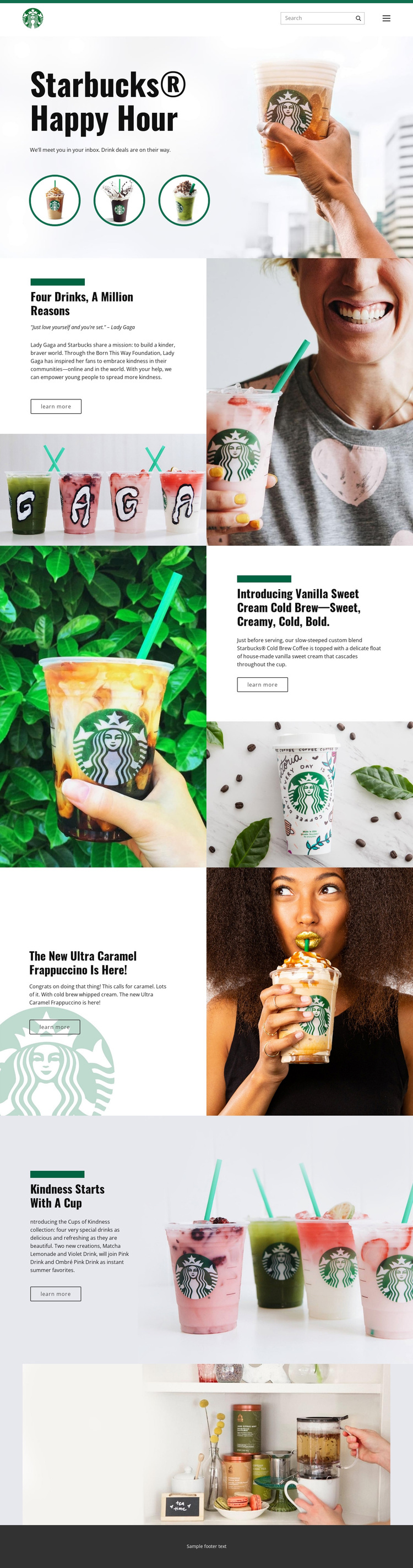
The page opens with a direct promotional idea: Starbucks Happy Hour supported by three circular drink images. That combination makes the design immediately suitable for projects where beverage imagery should carry as much attention as the written offer. Rather than relying on dense menus or long explanations, the template uses large photographs, short campaign messages, and generous space to establish its subject.
Its strongest distinction is the way product promotion and social campaign storytelling share the same layout system. The Four drinks, a million reasons section introduces the Lady Gaga and Born This Way Foundation association, while Cups of Kindness expands the collection through Matcha Lemonade, Violet Drink, Pink Drink, and Ombré Pink Drink. Separate features for Vanilla Sweet Cream Cold Brew and Ultra Caramel Frappuccino add focused product moments without breaking the editorial rhythm.
This makes the design a useful choice for a coffee or beverage campaign that needs more than a product grid. It can support a sequence in which a broad promotion introduces the subject, individual drinks receive visual emphasis, and a related campaign adds narrative depth. The dark, light, and green contrast also gives the page a recognizable visual direction that can distinguish it from layouts centered mainly on pricing, service cards, or dense informational copy.
Customize with Nicepage
Open this ready-made template in the Template Builder and customize it visually in the Nicepage editor. Replace demo content, edit page sections, and adapt the design to your project without rebuilding the template from scratch.
Start With a Ready-Made Template
Choose a Design for a New Page
Use a ready-made template as a starting point instead of creating every page from a blank canvas. When adding a new page in Nicepage, browse available designs, compare different layouts, and choose an option that already fits the general purpose and visual direction of your project.
Browse Different Page Designs
Explore Page Designs using search, thematic categories, Design Sets, and full-page previews. The collection includes layouts for different subjects and page purposes, making it easier to compare alternatives before selecting a design to customize.
Customize the Selected Template
After choosing a design, create the page and continue editing it visually in Nicepage. Replace the demo content, adjust images, typography, colors, sections, and other elements, and adapt the ready-made layout to your own content instead of rebuilding the design from the beginning.
Explore More Design Directions
If the first option does not match your project closely enough, return to the design collection and compare other templates before committing to a layout. This makes the template library useful not only for faster page creation, but also for exploring different visual approaches and finding a suitable starting point for a new project.
This workflow gives you access to a broad collection of ready-made designs that can be selected, compared, and customized according to the needs of each new page or project.