Flex 2 Template


Edit Template Offline
2. Create new page and search for id 18333
Edit Template Online
Create Awesome Websites


Free Nicepage Builder
Keywords
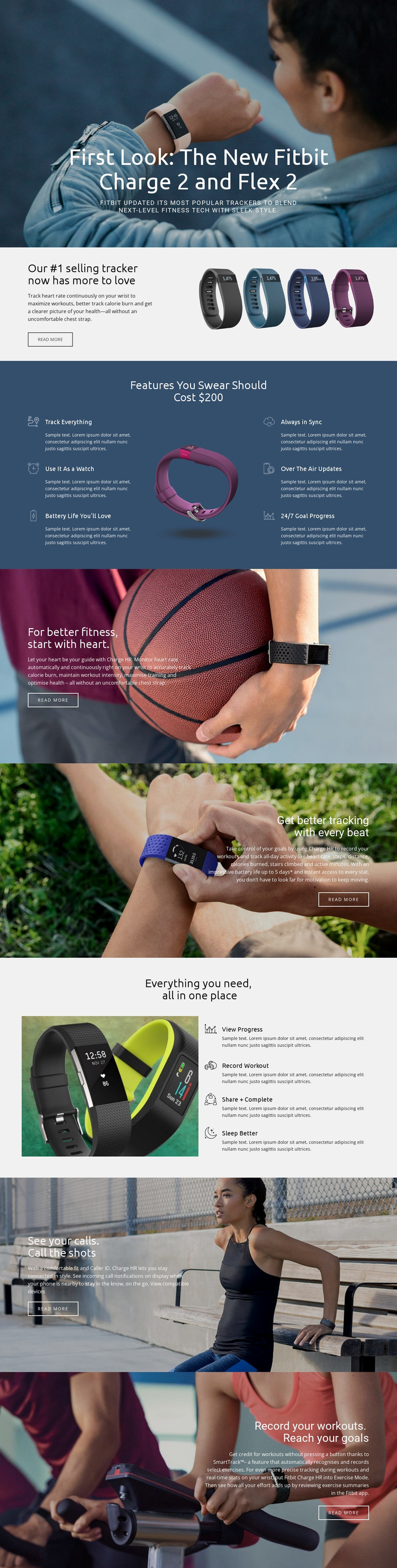
Six feature promises connect naturally with four daily tracking actions
The strongest reason to choose Flex 2 is the way it connects broad product coverage with recognizable use. The six primary feature items establish the range of the tracker: it can address activity tracking, watch functionality, battery life, synchronization, updates, and goal progress. That spread helps the design communicate more than one isolated selling point while keeping each benefit easy to identify around the central product image.
The later four-action group gives the feature story a more personal direction. “View Progress,” “Record Workout,” “Share + Complete,” and “Sleep Better” show how the device may fit into different moments of a user’s routine. Continuous heart-rate monitoring and the verified tracking of steps, distance, calories burned, stairs climbed, and active minutes add concrete depth to that narrative. SmartTrack extends the exercise emphasis by automatically recognizing and recording selected workouts.
The page also covers connected-device behavior through caller ID, incoming call notifications, and a visible compatibility link. This makes the design suitable for a product presentation that must balance health monitoring, daily convenience, and fitness activity rather than focusing only on technical specifications. Large photographs carry the energetic consumer tone, while split sections and feature panels keep the information organized. As a design option, Flex 2 stands out through this combination of visual storytelling and unusually broad tracker-focused content.
Customize with Nicepage
Open this ready-made template in the Template Builder and customize it visually in the Nicepage editor. Replace demo content, edit page sections, and adapt the design to your project without rebuilding the template from scratch.
Start With a Ready-Made Template
Choose a Design for a New Page
Use a ready-made template as a starting point instead of creating every page from a blank canvas. When adding a new page in Nicepage, browse available designs, compare different layouts, and choose an option that already fits the general purpose and visual direction of your project.
Browse Different Page Designs
Explore Page Designs using search, thematic categories, Design Sets, and full-page previews. The collection includes layouts for different subjects and page purposes, making it easier to compare alternatives before selecting a design to customize.
Customize the Selected Template
After choosing a design, create the page and continue editing it visually in Nicepage. Replace the demo content, adjust images, typography, colors, sections, and other elements, and adapt the ready-made layout to your own content instead of rebuilding the design from the beginning.
Explore More Design Directions
If the first option does not match your project closely enough, return to the design collection and compare other templates before committing to a layout. This makes the template library useful not only for faster page creation, but also for exploring different visual approaches and finding a suitable starting point for a new project.
This workflow gives you access to a broad collection of ready-made designs that can be selected, compared, and customized according to the needs of each new page or project.