Quiksilver Template


Edit Template Offline
2. Create new page and search for id 17884
Edit Template Online
Create Awesome Websites


Free Nicepage Builder
Keywords
Spring–Summer Storytelling Connects Collections with Boardriding Culture
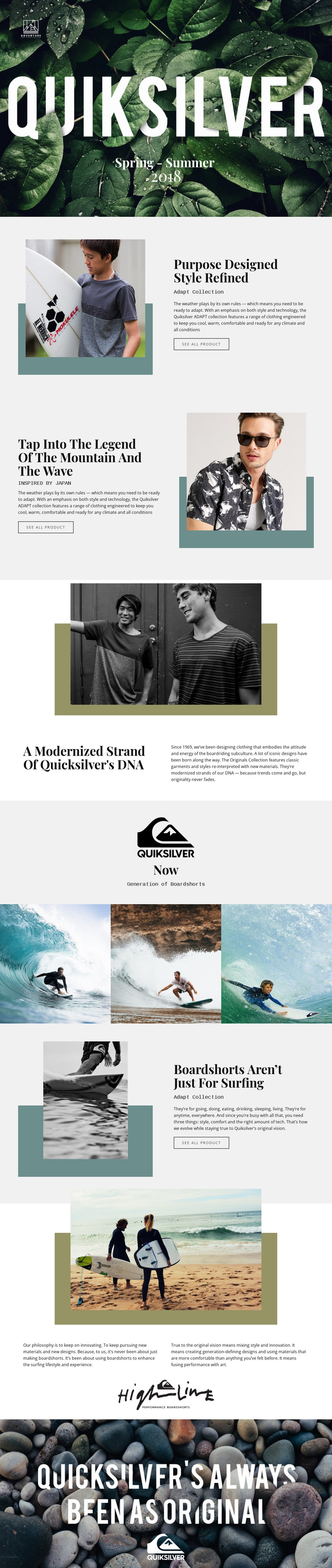
The strongest reason to choose this design is the way it lets product content and brand atmosphere share the same page. The Spring–Summer hero establishes a seasonal frame immediately, but the page does not remain at the level of a single campaign image. The Adapt Collection and the Japan-inspired story each receive their own image-and-copy treatment, with “See all product” actions connecting editorial context to further product viewing. That balance makes the collections part of a narrative rather than isolated catalog entries.
Quiksilver heritage adds a second layer of distinction. The Originals Collection section, centered “Now” milestone statement, and paired philosophy text give the page room to explain identity before the boardshorts section returns to a specific product category. Three surfing images provide a concise lifestyle proof point, while the beach photograph and final coastal statement reinforce the outdoor setting without relying on dense copy.
The visual direction is equally specific: bold white display lettering over dark photography, muted neutral surfaces, teal accents, geometric blocks, and generous spacing create a premium editorial tone. Choose this template when the project needs seasonal collections, recognizable brand heritage, and boardriding imagery to work together as one campaign experience. Its distinction comes from the relationship between product browsing and visual storytelling.
Customize with Nicepage
Open this ready-made template in the Template Builder and customize it visually in the Nicepage editor. Replace demo content, edit page sections, and adapt the design to your project without rebuilding the template from scratch.
Start With a Ready-Made Template
Choose a Design for a New Page
Use a ready-made template as a starting point instead of creating every page from a blank canvas. When adding a new page in Nicepage, browse available designs, compare different layouts, and choose an option that already fits the general purpose and visual direction of your project.
Browse Different Page Designs
Explore Page Designs using search, thematic categories, Design Sets, and full-page previews. The collection includes layouts for different subjects and page purposes, making it easier to compare alternatives before selecting a design to customize.
Customize the Selected Template
After choosing a design, create the page and continue editing it visually in Nicepage. Replace the demo content, adjust images, typography, colors, sections, and other elements, and adapt the ready-made layout to your own content instead of rebuilding the design from the beginning.
Explore More Design Directions
If the first option does not match your project closely enough, return to the design collection and compare other templates before committing to a layout. This makes the template library useful not only for faster page creation, but also for exploring different visual approaches and finding a suitable starting point for a new project.
This workflow gives you access to a broad collection of ready-made designs that can be selected, compared, and customized according to the needs of each new page or project.