
Future of corporate business Joomla Template


Edit Template Offline
2. Create new page and search for id 87063
Edit Template Online
Create Awesome Websites


Free Nicepage Builder
Keywords
Strategy, service, and contact regions suit structured Joomla content
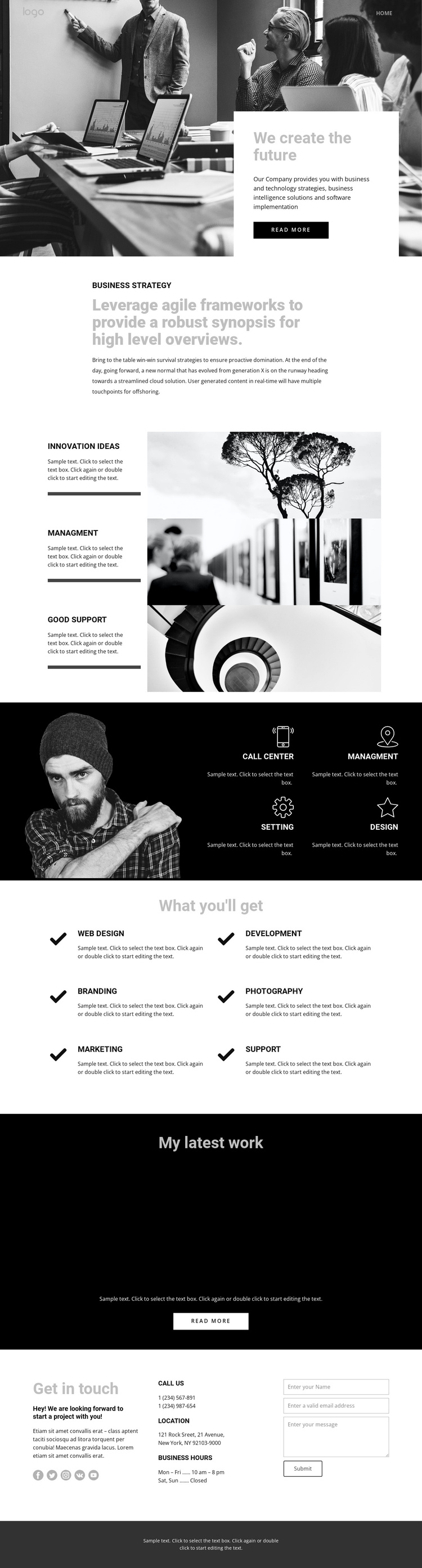
The business strategy introduction gives the page a clear informational starting point, while the following capability areas divide the design into reusable content regions. Three horizontal feature rows pair labels and descriptions with photography, making each capability distinct without breaking the monochrome visual language. A separate dark section groups four compact items—call center, management, setting, and design—beside a portrait image. Together, these areas provide more than a single message: they organize several kinds of business information within a shared page framework.
The six-item service collection adds another structured region under “What you'll get.” Its Web design, Development, Branding, Photography, Marketing, and Support labels can represent recurring service information, while the six-image portfolio gives the design a dedicated visual work area. The closing contact region is especially useful for a CMS-managed site because it brings together social links, phone details, location, business hours, and a project inquiry form in one defined area. Navigation and the dark footer provide shared boundaries around the content. In a Joomla project, this separation helps maintain coordinated presentation while strategy, services, work examples, and contact information are treated as distinct site content areas rather than one undifferentiated text block.
Customize with Nicepage
Open this ready-made template in the Joomla Page Builder and customize it visually in the Nicepage editor. Replace demo content, edit page sections, and adapt the design to your project without rebuilding the template from scratch.
Work With This Template in Joomla
Customize and Install the Joomla Template
Start with this ready-made template instead of building the Joomla design from scratch. Customize its layout, content, typography, images, sections, and other design elements visually in the Nicepage application, then export and install the Joomla Template, Nicepage Extension, and supported content on your Joomla website.
Edit the Template Directly in Joomla
After installation, you can edit the Joomla Template directly in Joomla with the Nicepage Joomla Extension. Customize the Header, Footer, Colors, Fonts, typography, and Page Templates from the Joomla workflow while keeping the site design connected with your CMS content.
Edit Joomla Articles Visually
Use the Nicepage Joomla Extension to open and edit Joomla Articles visually from the Joomla Administrator. Change text, images, sections, layouts, and other page content in the Nicepage editor while continuing to manage the Articles through Joomla.
Joomla Content and Template Integration
Use the customized template together with Joomla Articles, module Positions, menus, forms, Blog Pages, and other supported CMS elements. With the Nicepage Extension used as the Site Style Source, shared design settings can be applied across Joomla Articles while Joomla continues to provide the CMS environment for managing site content.
This workflow combines a ready-made Joomla Template with visual customization, direct template editing in Joomla, and continued content management through the Nicepage Joomla Extension.





















