Business team Joomla Template



A Two-Row Portrait Grid Creates a Structured Team Content Area
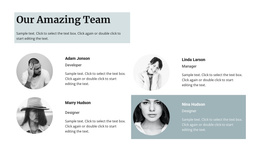
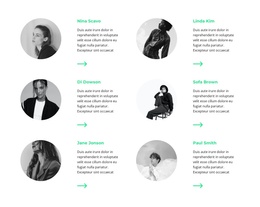
The two-row arrangement gives this team section a clear internal content model for a Joomla-managed page: six repeated portrait items, organized into three columns across two levels. Each item occupies an equal square cell, so the section presents the group as a coordinated set rather than as a single featured profile. Tight spacing and consistent alignment make the relationship between the six images immediately visible and keep the content area compact within a larger page.
The image treatment adds a second layer of organization. Alternating black-and-white and vivid blue-tinted portraits create visual categories or rhythm without introducing extra controls or interaction. Since the block is static and has no visible heading or written labels, its structure is carried primarily by the repeated portraits, their shared proportions, and their position in the grid. A Joomla-oriented project can therefore treat it as a stable visual content region for team information, with explanatory text or labels maintained in the surrounding page content when needed.
This interpretation is different from a complete CMS template: the block contributes one recognizable team area while Joomla manages the broader page and editorial environment. Nicepage's Joomla workflow can support visual page content and articles, but those CMS structures belong to the surrounding project, not to the six portrait cells themselves.
Customize with Nicepage
Open this ready-made template in the Joomla Page Builder and customize it visually in the Nicepage editor. Replace demo content, edit page sections, and adapt the design to your project without rebuilding the template from scratch.
Edit Template Offline
2. Create a new page or select existing
3. Click Add new block, search for id 80004 and click enter
Edit Template Online
Create Awesome Websites


Free Nicepage Builder
Keywords
Work With This Template in Joomla
Customize and Install the Joomla Template
Start with this ready-made template instead of building the Joomla design from scratch. Customize its layout, content, typography, images, sections, and other design elements visually in the Nicepage application, then export and install the Joomla Template, Nicepage Extension, and supported content on your Joomla website.
Edit the Template Directly in Joomla
After installation, you can edit the Joomla Template directly in Joomla with the Nicepage Joomla Extension. Customize the Header, Footer, Colors, Fonts, typography, and Page Templates from the Joomla workflow while keeping the site design connected with your CMS content.
Edit Joomla Articles Visually
Use the Nicepage Joomla Extension to open and edit Joomla Articles visually from the Joomla Administrator. Change text, images, sections, layouts, and other page content in the Nicepage editor while continuing to manage the Articles through Joomla.
Joomla Content and Template Integration
Use the customized template together with Joomla Articles, module Positions, menus, forms, Blog Pages, and other supported CMS elements. With the Nicepage Extension used as the Site Style Source, shared design settings can be applied across Joomla Articles while Joomla continues to provide the CMS environment for managing site content.
This workflow combines a ready-made Joomla Template with visual customization, direct template editing in Joomla, and continued content management through the Nicepage Joomla Extension.