Modern Korean Skincare Joomla Template


Edit Template Offline
2. Create new page and search for id 6672116
Edit Template Online
Create Awesome Websites


Free Nicepage Builder
Keywords
Skincare Categories and Store Regions Create Structured CMS Content
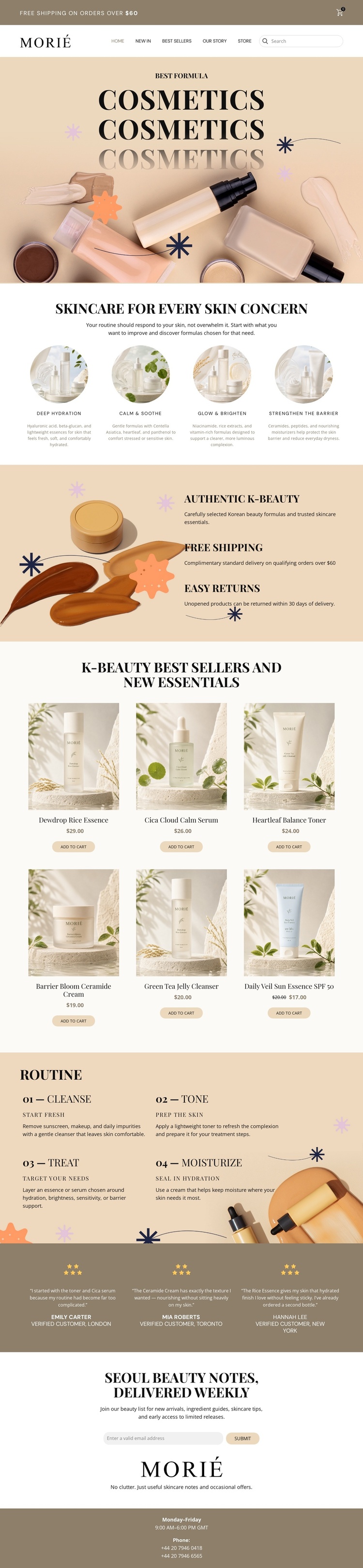
The design separates the storefront into clear content regions that can be understood and maintained in a CMS-oriented project. The Morié header groups navigation, search, and cart context, while the four concern categories divide the skincare subject into Deep Hydration, Calm & Soothe, Glow & Brighten, and Strengthen the Barrier. Those recurring informational areas give the page more structure than a single promotional product display.
The six product cards form a distinct catalog region, each connecting an image, product name, price, and add-to-cart action. The benefits block adds three service-oriented statements—Authentic K-Beauty, Free Shipping, and Easy Returns—while the routine block organizes educational content into Cleanse, Tone, Treat, and Moisturize. Together, these areas suggest separate content responsibilities: products can remain catalog-oriented, while benefits and routine information can support the broader store presentation.
The three testimonial entries provide a repeated proof section, and the newsletter block supplies a clearly identified subscription area. The footer contributes shared contact context through business hours and two phone numbers. In a Joomla project, this combination can support structured site content and navigation without requiring the design to be reduced to generic CMS terminology. The important value is the relationship between the storefront’s reusable regions, product content, customer reassurance, and contact areas.
Customize with Nicepage
Open this ready-made template in the Joomla Page Builder and customize it visually in the Nicepage editor. Replace demo content, edit page sections, and adapt the design to your project without rebuilding the template from scratch.
Work With This Template in Joomla
Customize and Install the Joomla Template
Start with this ready-made template instead of building the Joomla design from scratch. Customize its layout, content, typography, images, sections, and other design elements visually in the Nicepage application, then export and install the Joomla Template, Nicepage Extension, and supported content on your Joomla website.
Edit the Template Directly in Joomla
After installation, you can edit the Joomla Template directly in Joomla with the Nicepage Joomla Extension. Customize the Header, Footer, Colors, Fonts, typography, and Page Templates from the Joomla workflow while keeping the site design connected with your CMS content.
Edit Joomla Articles Visually
Use the Nicepage Joomla Extension to open and edit Joomla Articles visually from the Joomla Administrator. Change text, images, sections, layouts, and other page content in the Nicepage editor while continuing to manage the Articles through Joomla.
Joomla Content and Template Integration
Use the customized template together with Joomla Articles, module Positions, menus, forms, Blog Pages, and other supported CMS elements. With the Nicepage Extension used as the Site Style Source, shared design settings can be applied across Joomla Articles while Joomla continues to provide the CMS environment for managing site content.
This workflow combines a ready-made Joomla Template with visual customization, direct template editing in Joomla, and continued content management through the Nicepage Joomla Extension.