Indvidual consultation Joomla Template



Fleet-Electrification Copy Forms a Structured CMS Section
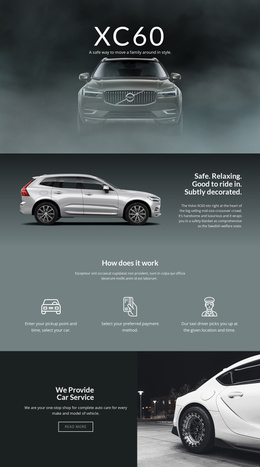
The heading “Individual consultation” and the supporting paragraph establish a compact informational unit about electrification of fleets in goods transportation. The eyebrow statement, “Good to ride in. Subtly decorated.”, supplies a short lead-in before the main invitation, while the separate “Safe. Relaxing.” statement adds a second reading point at the right edge. Together, these text groups give the section more structure than a single undivided paragraph.
The block’s full-width nighttime road image provides the visual context for that information. White text stands against the dark blue-black scene, and the white and red vehicle light trails reinforce the connection with road travel without introducing additional interface components. The left-aligned primary copy and narrow right-side text area remain distinct, so the consultation message can be understood as the central content while the vertical statement acts as supporting emphasis.
Within a Joomla-managed page, this block can serve as a reusable content region for transportation-focused information or a consultation invitation. Its content can sit alongside broader articles, service explanations, or contact areas managed elsewhere in the project, while the section preserves its own visual arrangement. A Joomla-oriented implementation therefore benefits from the block’s clearly bounded text groups: the CMS context surrounds the section, but the block itself remains one focused presentation of consultation content.
Customize with Nicepage
Open this ready-made template in the Joomla Page Builder and customize it visually in the Nicepage editor. Replace demo content, edit page sections, and adapt the design to your project without rebuilding the template from scratch.
Edit Template Offline
2. Create a new page or select existing
3. Click Add new block, search for id 50270 and click enter
Edit Template Online
Create Awesome Websites


Free Nicepage Builder
Keywords
Work With This Template in Joomla
Customize and Install the Joomla Template
Start with this ready-made template instead of building the Joomla design from scratch. Customize its layout, content, typography, images, sections, and other design elements visually in the Nicepage application, then export and install the Joomla Template, Nicepage Extension, and supported content on your Joomla website.
Edit the Template Directly in Joomla
After installation, you can edit the Joomla Template directly in Joomla with the Nicepage Joomla Extension. Customize the Header, Footer, Colors, Fonts, typography, and Page Templates from the Joomla workflow while keeping the site design connected with your CMS content.
Edit Joomla Articles Visually
Use the Nicepage Joomla Extension to open and edit Joomla Articles visually from the Joomla Administrator. Change text, images, sections, layouts, and other page content in the Nicepage editor while continuing to manage the Articles through Joomla.
Joomla Content and Template Integration
Use the customized template together with Joomla Articles, module Positions, menus, forms, Blog Pages, and other supported CMS elements. With the Nicepage Extension used as the Site Style Source, shared design settings can be applied across Joomla Articles while Joomla continues to provide the CMS environment for managing site content.
This workflow combines a ready-made Joomla Template with visual customization, direct template editing in Joomla, and continued content management through the Nicepage Joomla Extension.