Modern Parking Service Joomla Template



Edit Template Offline
2. Create new page and search for id 6622391
Edit Template Online
Create Awesome Websites


Free Nicepage Builder
Keywords
Parking Categories and FAQ Form Structured Content Regions
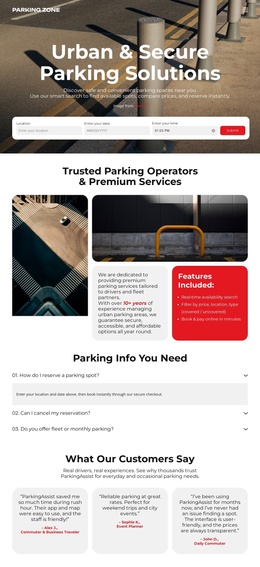
The service categories give this design a natural content structure for a Joomla-managed parking site. Short-Term, Long-Term, Monthly, and Airport Parking appear as distinct repeated entries rather than being buried in one paragraph. That organization can support clear navigation and editorial maintenance as parking information changes. The About section and two feature cards provide a separate region for explaining the service, while the benefits section groups location, pricing, security, booking, and cancellation information.
The reservation process adds another structured content relationship. Its four stages—search available dates, choose a preferred option, reserve online, and arrive and park—turn the service promise into an ordered explanation. Below it, the testimonial, FAQ questions, monthly offer, and closing Book Now areas give the page additional regions for visitor concerns and booking prompts. The shared dark header-style imagery and compact footer help these different content areas remain visually connected.
Joomla is therefore relevant here as a content environment for recurring service information, menus, contact material, and structured regional content—not because the template is proven to contain Joomla Articles already. A Joomla project can retain the page's separation between categories, benefits, process guidance, and FAQs while managing those areas through the CMS. The Joomla Extension can support article design when that integration is selected.
Customize with Nicepage
Open this ready-made template in the Joomla Page Builder and customize it visually in the Nicepage editor. Replace demo content, edit page sections, and adapt the design to your project without rebuilding the template from scratch.
Work With This Template in Joomla
Customize and Install the Joomla Template
Start with this ready-made template instead of building the Joomla design from scratch. Customize its layout, content, typography, images, sections, and other design elements visually in the Nicepage application, then export and install the Joomla Template, Nicepage Extension, and supported content on your Joomla website.
Edit the Template Directly in Joomla
After installation, you can edit the Joomla Template directly in Joomla with the Nicepage Joomla Extension. Customize the Header, Footer, Colors, Fonts, typography, and Page Templates from the Joomla workflow while keeping the site design connected with your CMS content.
Edit Joomla Articles Visually
Use the Nicepage Joomla Extension to open and edit Joomla Articles visually from the Joomla Administrator. Change text, images, sections, layouts, and other page content in the Nicepage editor while continuing to manage the Articles through Joomla.
Joomla Content and Template Integration
Use the customized template together with Joomla Articles, module Positions, menus, forms, Blog Pages, and other supported CMS elements. With the Nicepage Extension used as the Site Style Source, shared design settings can be applied across Joomla Articles while Joomla continues to provide the CMS environment for managing site content.
This workflow combines a ready-made Joomla Template with visual customization, direct template editing in Joomla, and continued content management through the Nicepage Joomla Extension.