Luxury Private Jet Joomla Template


Edit Template Offline
2. Create new page and search for id 6649042
Edit Template Online
Create Awesome Websites


Free Nicepage Builder
Keywords
Service, Route, and Contact Regions Fit Structured CMS Content
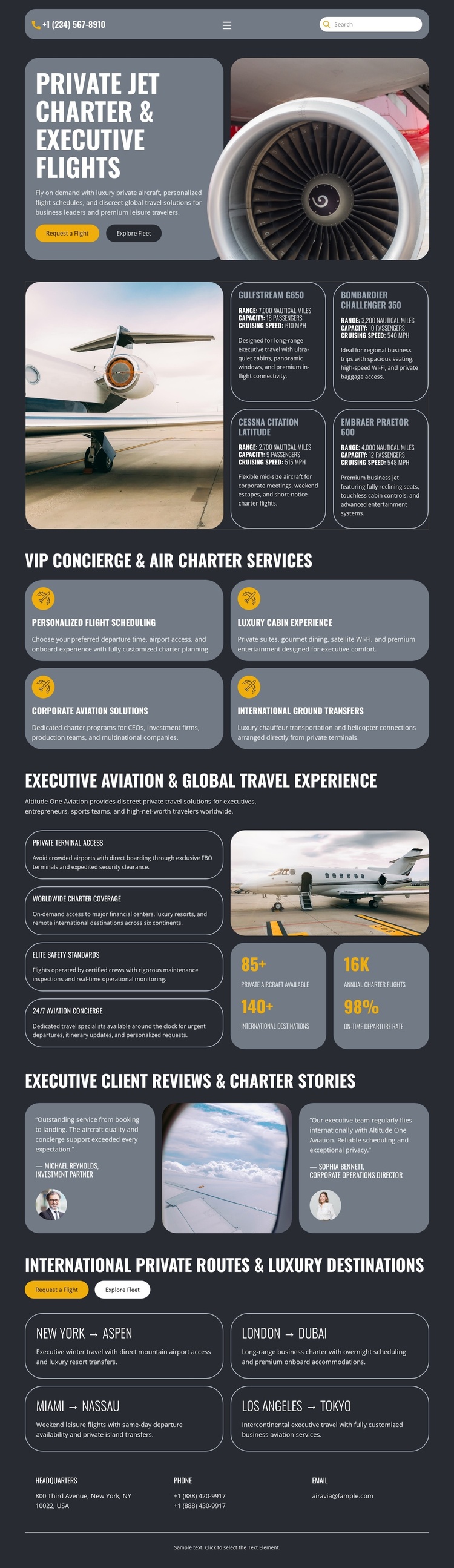
The service section divides the design into four clearly labeled information areas: personalized flight scheduling, luxury cabin experience, corporate aviation solutions, and international ground transfers. This organization gives a Joomla-managed project practical content regions for maintaining recurring aviation information while keeping the service presentation visually coordinated. It is more specific than treating the page as a generic promotional layout.
The route showcase creates a second structured content group. Four bordered cards identify New York–Aspen, London–Dubai, Miami–Nassau, and Los Angeles–Tokyo, each presented as a destination relationship rather than as an undifferentiated paragraph. Above them, Request a flight and Explore fleet buttons connect the route information to the page’s broader charter subject. The experience section adds another reusable region with private terminal access, worldwide route coverage, elite guest standards, and 24/7 aviation concierge messaging.
Testimonials and the closing contact row complete the content map. Two review cards can remain a distinct editorial area, while headquarters, phone, and email labels provide a clear contact region at the end of the page. Together, these service, route, experience, review, and contact areas give a Joomla project a coherent content arrangement without claiming that specific Joomla Articles, categories, or module positions already exist.
Customize with Nicepage
Open this ready-made template in the Joomla Page Builder and customize it visually in the Nicepage editor. Replace demo content, edit page sections, and adapt the design to your project without rebuilding the template from scratch.
Work With This Template in Joomla
Customize and Install the Joomla Template
Start with this ready-made template instead of building the Joomla design from scratch. Customize its layout, content, typography, images, sections, and other design elements visually in the Nicepage application, then export and install the Joomla Template, Nicepage Extension, and supported content on your Joomla website.
Edit the Template Directly in Joomla
After installation, you can edit the Joomla Template directly in Joomla with the Nicepage Joomla Extension. Customize the Header, Footer, Colors, Fonts, typography, and Page Templates from the Joomla workflow while keeping the site design connected with your CMS content.
Edit Joomla Articles Visually
Use the Nicepage Joomla Extension to open and edit Joomla Articles visually from the Joomla Administrator. Change text, images, sections, layouts, and other page content in the Nicepage editor while continuing to manage the Articles through Joomla.
Joomla Content and Template Integration
Use the customized template together with Joomla Articles, module Positions, menus, forms, Blog Pages, and other supported CMS elements. With the Nicepage Extension used as the Site Style Source, shared design settings can be applied across Joomla Articles while Joomla continues to provide the CMS environment for managing site content.
This workflow combines a ready-made Joomla Template with visual customization, direct template editing in Joomla, and continued content management through the Nicepage Joomla Extension.