
Our design is unique Joomla Template
Edit Template Offline
2. Create new page and search for id 21562
Edit Template Online
Create Awesome Websites


Free Nicepage Builder
Keywords
Mission Panels and Culture Content for a Joomla Site
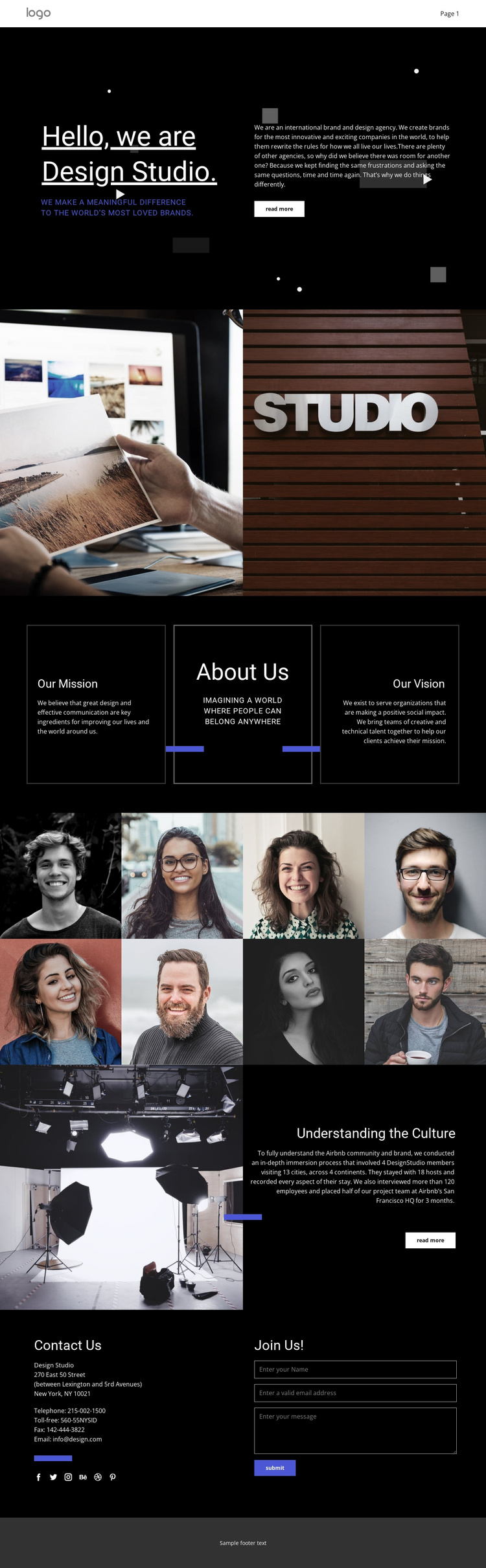
The three bordered panels for Our Mission, About Us, and Our Vision divide the agency profile into clear informational regions. That separation is useful for a Joomla-oriented site because core brand content can remain organized into distinct areas rather than being presented as one uninterrupted text block. The dark central identity panel also gives the mission and vision material a visible relationship, while the blue accent lines connect the panels to the wider visual system.
The portrait showcase adds a second type of content region. Eight images arranged in two rows can represent the studio’s people or working culture without competing with the more explanatory mission content. Below it, “Understanding the Culture” combines a project image, descriptive copy, and a Read more action, creating a structured feature area for case-study material. Navigation, social links, and the contact section then connect these content groups within one shared page framework.
The final contact area is especially relevant to a service-oriented Joomla project: address and social information sit beside a message inquiry form and Submit action. Joomla can provide the managed environment for maintaining these recurring informational regions while the template preserves their visual relationships. The result is a design that organizes agency identity, project evidence, and contact content into recognizable site sections rather than treating them as unrelated blocks.
Customize with Nicepage
Open this ready-made template in the Joomla Page Builder and customize it visually in the Nicepage editor. Replace demo content, edit page sections, and adapt the design to your project without rebuilding the template from scratch.
Work With This Template in Joomla
Customize and Install the Joomla Template
Start with this ready-made template instead of building the Joomla design from scratch. Customize its layout, content, typography, images, sections, and other design elements visually in the Nicepage application, then export and install the Joomla Template, Nicepage Extension, and supported content on your Joomla website.
Edit the Template Directly in Joomla
After installation, you can edit the Joomla Template directly in Joomla with the Nicepage Joomla Extension. Customize the Header, Footer, Colors, Fonts, typography, and Page Templates from the Joomla workflow while keeping the site design connected with your CMS content.
Edit Joomla Articles Visually
Use the Nicepage Joomla Extension to open and edit Joomla Articles visually from the Joomla Administrator. Change text, images, sections, layouts, and other page content in the Nicepage editor while continuing to manage the Articles through Joomla.
Joomla Content and Template Integration
Use the customized template together with Joomla Articles, module Positions, menus, forms, Blog Pages, and other supported CMS elements. With the Nicepage Extension used as the Site Style Source, shared design settings can be applied across Joomla Articles while Joomla continues to provide the CMS environment for managing site content.
This workflow combines a ready-made Joomla Template with visual customization, direct template editing in Joomla, and continued content management through the Nicepage Joomla Extension.





















