Cutiest home pets Joomla Template


Edit Template Offline
2. Create new page and search for id 12869
Edit Template Online
Create Awesome Websites


Free Nicepage Builder
Keywords
Research Sections and Related Stories Form Structured Joomla Content Areas
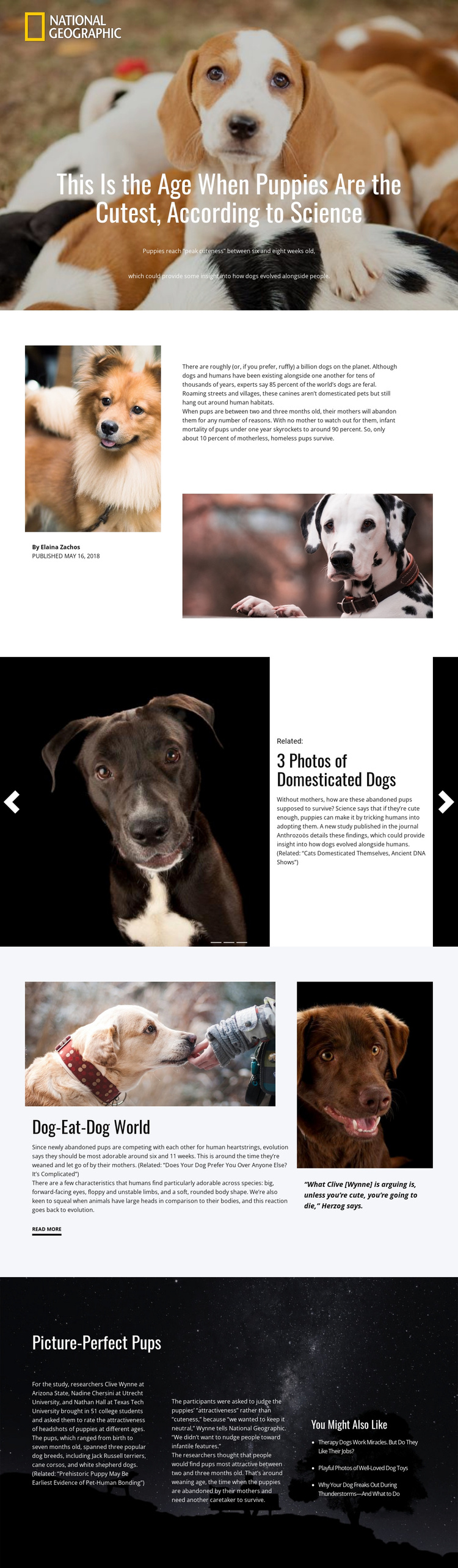
The page separates its editorial material into recognizable regions that can be interpreted as managed site content rather than one undifferentiated text field. The opening hero establishes the feature topic, while the split introduction places the author credit, publication context, supporting dog photographs, and introductory article copy into related but distinct areas. This division makes it easier to preserve the visual relationship between feature metadata, imagery, and the main reading content.
The three-slide related-story section adds a second content pattern. Each repeated slide contains an image, related label, story title, description, and controls, so the design can accommodate a set of recurring editorial references while keeping them visually coordinated. The “Dog-Eat-Dog World” section then supports a different information region: a research discussion is paired with a prominent dog photograph and a separate quotation panel, with a read-more link marking the next step in the article.
At the end, “Picture-Perfect Pups” groups methodology, researchers and institutions, findings, and related links across a dark three-column arrangement. In a Joomla-oriented project, these are useful distinctions between feature content, supporting media, structured research information, and onward reading. The template does not prove that Joomla Articles or module positions already exist, but its repeated sections, visual regions, and editorial hierarchy provide a coherent basis for organizing CMS-managed content while retaining the design’s magazine character.
Customize with Nicepage
Open this ready-made template in the Joomla Page Builder and customize it visually in the Nicepage editor. Replace demo content, edit page sections, and adapt the design to your project without rebuilding the template from scratch.
Work With This Template in Joomla
Customize and Install the Joomla Template
Start with this ready-made template instead of building the Joomla design from scratch. Customize its layout, content, typography, images, sections, and other design elements visually in the Nicepage application, then export and install the Joomla Template, Nicepage Extension, and supported content on your Joomla website.
Edit the Template Directly in Joomla
After installation, you can edit the Joomla Template directly in Joomla with the Nicepage Joomla Extension. Customize the Header, Footer, Colors, Fonts, typography, and Page Templates from the Joomla workflow while keeping the site design connected with your CMS content.
Edit Joomla Articles Visually
Use the Nicepage Joomla Extension to open and edit Joomla Articles visually from the Joomla Administrator. Change text, images, sections, layouts, and other page content in the Nicepage editor while continuing to manage the Articles through Joomla.
Joomla Content and Template Integration
Use the customized template together with Joomla Articles, module Positions, menus, forms, Blog Pages, and other supported CMS elements. With the Nicepage Extension used as the Site Style Source, shared design settings can be applied across Joomla Articles while Joomla continues to provide the CMS environment for managing site content.
This workflow combines a ready-made Joomla Template with visual customization, direct template editing in Joomla, and continued content management through the Nicepage Joomla Extension.