Quality is our goal Joomla Template


Edit Template Offline
2. Create new page and search for id 108070
Edit Template Online
Create Awesome Websites


Free Nicepage Builder
Keywords
The Promise Cards and Contact Region Create Clear Joomla Content Areas
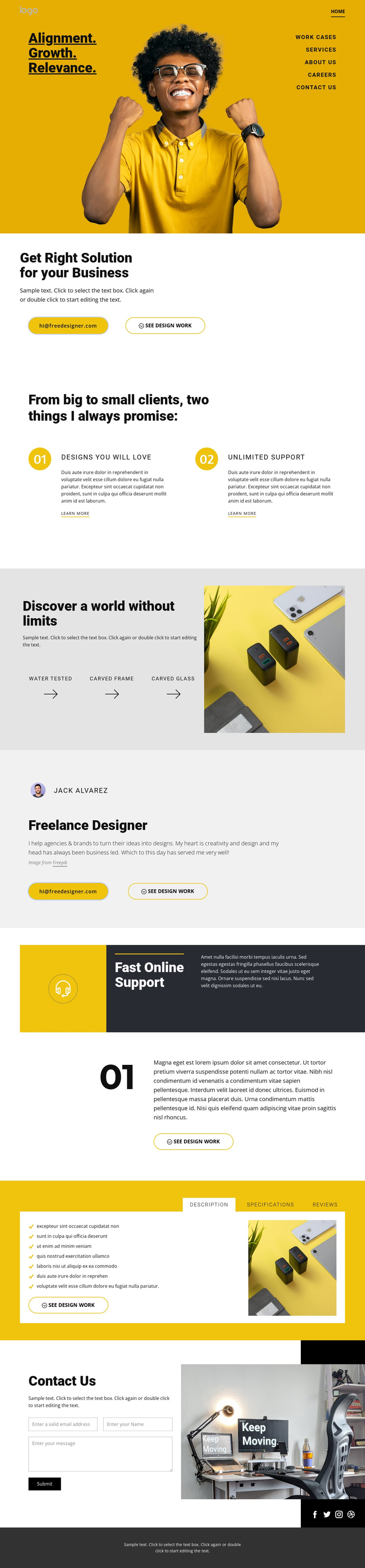
The opening navigation leads into a series of distinct information regions that can be understood independently: a business-solution introduction, two promise cards, a capability showcase, a designer profile, support information, tabbed details, and contact content. This separation is useful for a Joomla-oriented site structure because recurring informational areas have visible roles instead of being embedded in one undifferentiated block. The contact region is especially clear, pairing inquiry copy and a form with a large workshop photograph.
The page also gives navigation and shared site content a strong visual frame. The hero places the primary menu over a bright yellow and photographic composition, while the dark social strip and footer create a consistent closing area for Facebook, Twitter, Instagram, and Dribbble links. The two numbered promise cards can hold structured service messages, and the Description, Specifications, and Reviews tabs provide a contained way to organize related information without changing the surrounding page. In a Joomla project, these regions offer a practical content hierarchy: broad introduction first, service and profile information next, supporting details after that, and a defined contact destination at the end.
Customize with Nicepage
Open this ready-made template in the Joomla Page Builder and customize it visually in the Nicepage editor. Replace demo content, edit page sections, and adapt the design to your project without rebuilding the template from scratch.
Work With This Template in Joomla
Customize and Install the Joomla Template
Start with this ready-made template instead of building the Joomla design from scratch. Customize its layout, content, typography, images, sections, and other design elements visually in the Nicepage application, then export and install the Joomla Template, Nicepage Extension, and supported content on your Joomla website.
Edit the Template Directly in Joomla
After installation, you can edit the Joomla Template directly in Joomla with the Nicepage Joomla Extension. Customize the Header, Footer, Colors, Fonts, typography, and Page Templates from the Joomla workflow while keeping the site design connected with your CMS content.
Edit Joomla Articles Visually
Use the Nicepage Joomla Extension to open and edit Joomla Articles visually from the Joomla Administrator. Change text, images, sections, layouts, and other page content in the Nicepage editor while continuing to manage the Articles through Joomla.
Joomla Content and Template Integration
Use the customized template together with Joomla Articles, module Positions, menus, forms, Blog Pages, and other supported CMS elements. With the Nicepage Extension used as the Site Style Source, shared design settings can be applied across Joomla Articles while Joomla continues to provide the CMS environment for managing site content.
This workflow combines a ready-made Joomla Template with visual customization, direct template editing in Joomla, and continued content management through the Nicepage Joomla Extension.