Concept and analysis WordPress Theme


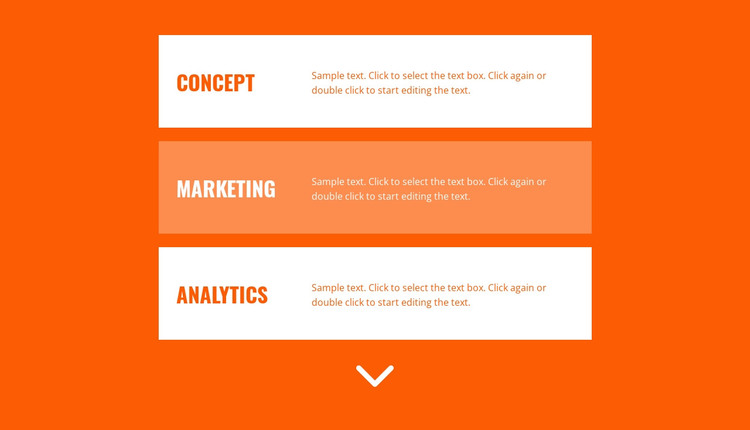
Concept, Marketing, and Analytics as Stable Page Content
The left-aligned headings for Concept, Marketing, and Analytics make the block read as a compact set of permanent capability categories rather than a stream of unrelated text. Each heading is paired with a supporting paragraph on the right, creating a predictable content relationship that works well for a WordPress-managed page where the section may need to remain visually consistent as surrounding content develops. The vertical order also gives each category enough space to be read independently.
Visually, the bright orange background establishes the section's identity, while alternating white and light-orange cards mark the boundaries between the three entries. Bold condensed uppercase type creates a strong scan path through the headings; the smaller paragraphs then provide the explanatory layer. Since the displayed paragraphs are sample text, they can be replaced with publishable descriptions appropriate to the page while retaining the same three-card structure and alignment.
In a WordPress-oriented project, this block can function as a stable capabilities section within page content managed alongside other site material. It could sit between an introductory area and later proof, service detail, or contact content. The section's repeated card pattern is useful when the same visual language should be preserved while content around it changes. It remains one reusable page section, not a complete WordPress Theme, and the broader site supplies its other templates, pages, and content areas.
Customize with Nicepage
Open this ready-made template in the WordPress Website Builder and customize it visually in the Nicepage editor. Replace demo content, edit page sections, and adapt the design to your project without rebuilding the template from scratch.
Edit Template Offline
2. Create a new page or select existing
3. Click Add new block, search for id 901193 and click enter
Edit Template Online
Create Awesome Websites


Free Nicepage Builder
Keywords
Manage and Edit This Theme in WordPress
Customize and Install the WordPress Theme
Start with this ready-made theme instead of building the WordPress design from scratch. Customize its layout, content, typography, images, sections, and other design elements visually in Nicepage editor, then export and install the WordPress Theme, Plugin, and Pages on your WordPress site. The Nicepage WordPress Plugin lets you continue working with the site after installation.
Edit the Theme Directly in WordPress
After installation, you can edit the WordPress Theme directly in WordPress with the Nicepage WordPress Plugin. Use Site Style to customize site Colors, Fonts, Header, Footer, Blog, and Post Page Templates while working within your WordPress website.
Edit WordPress Pages Visually
Use the Nicepage WordPress Plugin to edit page content directly from the WordPress admin area. Open a WordPress Page with Nicepage and visually change its text, images, sections, and other page elements while continuing to manage the Page through WordPress.
WordPress Content and Theme Integration
Use the customized theme with WordPress Pages, Posts, Blog and Post Templates, menus, widgets, and other CMS-managed content. Shared theme elements such as Colors, Fonts, Header, Footer, Blog, and Post Page Templates can be managed as part of the overall site design, while WordPress provides the CMS environment for managing site content.
This workflow combines a ready-made WordPress Theme with visual customization, direct theme editing in WordPress, and continued content management through the Nicepage WordPress Plugin.