Team of two stylists WordPress Theme


A Centered Introduction for WordPress-Managed Testimonial Content
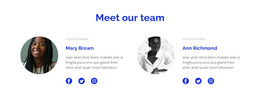
The block’s strongest content relationship is between the central introduction and the two personal statements on either side. “Our Team” supplies the shared heading, with a supporting paragraph directly beneath it. Linda Hudson’s portrait and quote occupy the left region, while Laura Larson’s corresponding portrait and quote occupy the right. The repeated circular image treatment makes the two items feel related, but the three-column alignment keeps each statement visually distinct.
For a WordPress-managed page, this block can serve as stable testimonial or team-related content within a broader site. Its content model is already clear enough to place alongside other page sections: the middle column introduces the subject, and the outer columns provide two attributed voices. Because the interaction is static, visitors can read both statements without opening panels or moving through a carousel. The compact text also leaves the center heading visible as the organizing point.
The displayed names and quotations are sample content rather than confirmed customer or business claims. They can be replaced with suitable page content while preserving the same portrait-to-statement relationship. The monochrome palette and white background give the section a restrained visual setting that can sit inside a WordPress page without dictating the design of the wider theme. It remains one reusable content area, not a complete WordPress Theme.
Customize with Nicepage
Open this ready-made template in the WordPress Website Builder and customize it visually in the Nicepage editor. Replace demo content, edit page sections, and adapt the design to your project without rebuilding the template from scratch.
Edit Template Offline
2. Create a new page or select existing
3. Click Add new block, search for id 864079 and click enter
Edit Template Online
Create Awesome Websites


Free Nicepage Builder
Keywords
Manage and Edit This Theme in WordPress
Customize and Install the WordPress Theme
Start with this ready-made theme instead of building the WordPress design from scratch. Customize its layout, content, typography, images, sections, and other design elements visually in Nicepage editor, then export and install the WordPress Theme, Plugin, and Pages on your WordPress site. The Nicepage WordPress Plugin lets you continue working with the site after installation.
Edit the Theme Directly in WordPress
After installation, you can edit the WordPress Theme directly in WordPress with the Nicepage WordPress Plugin. Use Site Style to customize site Colors, Fonts, Header, Footer, Blog, and Post Page Templates while working within your WordPress website.
Edit WordPress Pages Visually
Use the Nicepage WordPress Plugin to edit page content directly from the WordPress admin area. Open a WordPress Page with Nicepage and visually change its text, images, sections, and other page elements while continuing to manage the Page through WordPress.
WordPress Content and Theme Integration
Use the customized theme with WordPress Pages, Posts, Blog and Post Templates, menus, widgets, and other CMS-managed content. Shared theme elements such as Colors, Fonts, Header, Footer, Blog, and Post Page Templates can be managed as part of the overall site design, while WordPress provides the CMS environment for managing site content.
This workflow combines a ready-made WordPress Theme with visual customization, direct theme editing in WordPress, and continued content management through the Nicepage WordPress Plugin.