Color business table WordPress Theme


The Table Turns Staff Information Into Stable Page Content
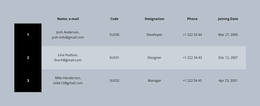
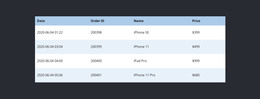
The block reads as a durable staff-information section because its three displayed records follow one fixed six-column model. Each row connects a name with an e-mail address, code, designation, phone number, and joining date, while the black numbered column supplies an immediate index. The sample role labels Developer, Designer, and Manager demonstrate the role field, but the displayed names and contact values can be replaced as page content without changing the table’s visual or organizational purpose.
For a WordPress-oriented interpretation, the strongest fit is permanent or reusable page content rather than a claim about a blog, post list, or dynamic CMS component. The muted blue-gray background and alternating light rows help the directory sit as a defined section within a broader page, and the compact centered typography keeps the repeated records consistent. Other WordPress-managed content can surround the block without changing its responsibility to present staff details in a predictable format.
Nicepage’s WordPress Pages workflow provides context for placing designed content within a wider WordPress project. The table remains one page section, not a standalone WordPress Theme. Its practical contribution is a visually consistent area for staff records that can coexist with additional page content while preserving the distinction between identity, contact, role, reference, and date fields.
Customize with Nicepage
Open this ready-made template in the WordPress Website Builder and customize it visually in the Nicepage editor. Replace demo content, edit page sections, and adapt the design to your project without rebuilding the template from scratch.
Edit Template Offline
2. Create a new page or select existing
3. Click Add new block, search for id 85570 and click enter
Edit Template Online
Create Awesome Websites


Free Nicepage Builder
Keywords
Manage and Edit This Theme in WordPress
Customize and Install the WordPress Theme
Start with this ready-made theme instead of building the WordPress design from scratch. Customize its layout, content, typography, images, sections, and other design elements visually in Nicepage editor, then export and install the WordPress Theme, Plugin, and Pages on your WordPress site. The Nicepage WordPress Plugin lets you continue working with the site after installation.
Edit the Theme Directly in WordPress
After installation, you can edit the WordPress Theme directly in WordPress with the Nicepage WordPress Plugin. Use Site Style to customize site Colors, Fonts, Header, Footer, Blog, and Post Page Templates while working within your WordPress website.
Edit WordPress Pages Visually
Use the Nicepage WordPress Plugin to edit page content directly from the WordPress admin area. Open a WordPress Page with Nicepage and visually change its text, images, sections, and other page elements while continuing to manage the Page through WordPress.
WordPress Content and Theme Integration
Use the customized theme with WordPress Pages, Posts, Blog and Post Templates, menus, widgets, and other CMS-managed content. Shared theme elements such as Colors, Fonts, Header, Footer, Blog, and Post Page Templates can be managed as part of the overall site design, while WordPress provides the CMS environment for managing site content.
This workflow combines a ready-made WordPress Theme with visual customization, direct theme editing in WordPress, and continued content management through the Nicepage WordPress Plugin.