Table with Gradient WordPress Theme


Stable Comparison Content for a WordPress-Managed Page
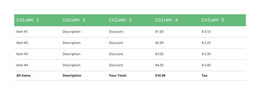
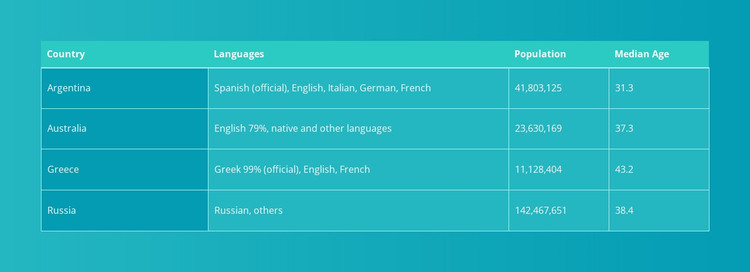
The table reads as stable informational content rather than time-sensitive editorial material. Its four labeled fields—Country, Languages, Population, and Median Age—establish a clear data model, while four visible rows repeat the same relationship for each country entry. That makes the block suitable for a WordPress-managed page where a comparison section needs to remain visually consistent alongside other publishable content.
The visual structure supports that page-content role. The table occupies most of the available section width in a centered arrangement, so the comparison remains one substantial content region. A contrasting header row separates field names from the teal body, and thin light borders identify each compact cell. Left-aligned text gives the columns a consistent reading edge, while stronger contrast in the first column helps visitors locate the country label before moving across language, population, and median-age values. The turquoise gradient distinguishes the section without adding interaction.
A broader WordPress project can place this table beside other page sections while maintaining its own content boundary. Nicepage’s WordPress Pages workflow supports page-oriented project context, but it does not imply that WordPress content objects are already inside this block. The underlying entity remains one static comparison section whose sample values can be replaced while its four-column arrangement and four-row pattern stay intact.
Customize with Nicepage
Open this ready-made template in the WordPress Website Builder and customize it visually in the Nicepage editor. Replace demo content, edit page sections, and adapt the design to your project without rebuilding the template from scratch.
Edit Template Offline
2. Create a new page or select existing
3. Click Add new block, search for id 83781 and click enter
Edit Template Online
Create Awesome Websites


Free Nicepage Builder
Keywords
Manage and Edit This Theme in WordPress
Customize and Install the WordPress Theme
Start with this ready-made theme instead of building the WordPress design from scratch. Customize its layout, content, typography, images, sections, and other design elements visually in Nicepage editor, then export and install the WordPress Theme, Plugin, and Pages on your WordPress site. The Nicepage WordPress Plugin lets you continue working with the site after installation.
Edit the Theme Directly in WordPress
After installation, you can edit the WordPress Theme directly in WordPress with the Nicepage WordPress Plugin. Use Site Style to customize site Colors, Fonts, Header, Footer, Blog, and Post Page Templates while working within your WordPress website.
Edit WordPress Pages Visually
Use the Nicepage WordPress Plugin to edit page content directly from the WordPress admin area. Open a WordPress Page with Nicepage and visually change its text, images, sections, and other page elements while continuing to manage the Page through WordPress.
WordPress Content and Theme Integration
Use the customized theme with WordPress Pages, Posts, Blog and Post Templates, menus, widgets, and other CMS-managed content. Shared theme elements such as Colors, Fonts, Header, Footer, Blog, and Post Page Templates can be managed as part of the overall site design, while WordPress provides the CMS environment for managing site content.
This workflow combines a ready-made WordPress Theme with visual customization, direct theme editing in WordPress, and continued content management through the Nicepage WordPress Plugin.