
Elegant Eau de Parfum WordPress Theme


Edit Template Offline
2. Create new page and search for id 6625459
Edit Template Online
Create Awesome Websites


Free Nicepage Builder
Keywords
Collection Cards and Editorial Sections Support Managed Fragrance Content
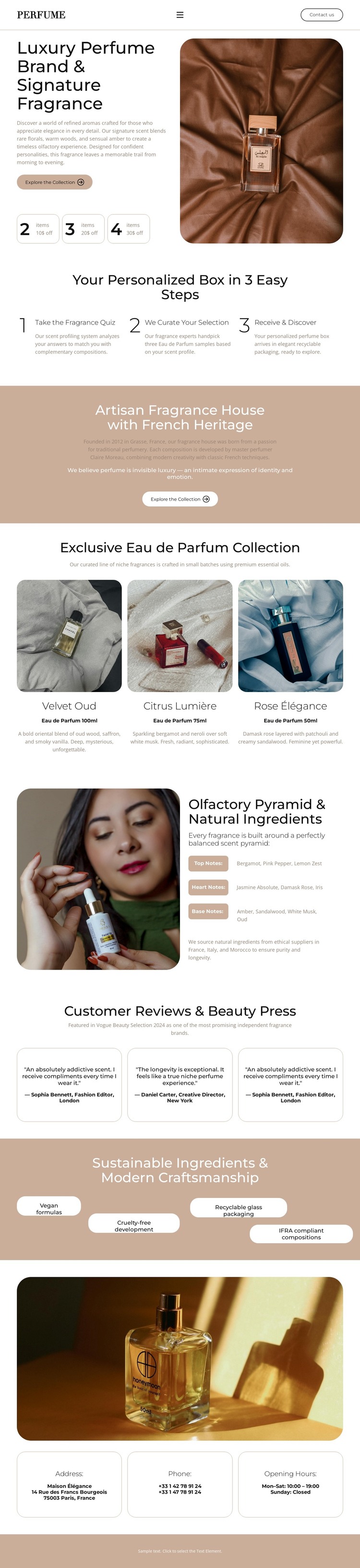
The page separates permanent brand information from repeated collection-oriented content in a way that suits a WordPress-managed project. The hero can carry the stable introduction to the fragrance house and its signature product, while the three-step personalized-box section explains the visitor experience in a dedicated content area. The heritage panel adds an editorial brand-story region, giving the site a place for context beyond product presentation.
The three perfume cards are the strongest repeated content pattern on the page. Each card combines a photograph, label, and short description, making the group a useful visual model for presenting collection entries or related fragrance content. The ingredient section adds a more explanatory page area through its image, olfactory-pyramid label, and natural-ingredient copy. Three testimonial cards create another repeated group for displayed customer and press quotations, while the sustainability band gathers four concise attributes into one recognizable visual region.
The closing address, phone, and opening-hours cards provide stable contact content beneath a final product image. Together with navigation and the footer, these areas give a WordPress theme clear page-oriented content zones. If the project later introduces regularly updated editorial material, it can be placed around this established visual system; the analysis does not claim that posts, categories, or blog structures already exist. The theme’s value lies in its defined relationship between brand pages, collection content, proof, and contact information.
Customize with Nicepage
Open this ready-made template in the WordPress Website Builder and customize it visually in the Nicepage editor. Replace demo content, edit page sections, and adapt the design to your project without rebuilding the template from scratch.
Manage and Edit This Theme in WordPress
Customize and Install the WordPress Theme
Start with this ready-made theme instead of building the WordPress design from scratch. Customize its layout, content, typography, images, sections, and other design elements visually in Nicepage editor, then export and install the WordPress Theme, Plugin, and Pages on your WordPress site. The Nicepage WordPress Plugin lets you continue working with the site after installation.
Edit the Theme Directly in WordPress
After installation, you can edit the WordPress Theme directly in WordPress with the Nicepage WordPress Plugin. Use Site Style to customize site Colors, Fonts, Header, Footer, Blog, and Post Page Templates while working within your WordPress website.
Edit WordPress Pages Visually
Use the Nicepage WordPress Plugin to edit page content directly from the WordPress admin area. Open a WordPress Page with Nicepage and visually change its text, images, sections, and other page elements while continuing to manage the Page through WordPress.
WordPress Content and Theme Integration
Use the customized theme with WordPress Pages, Posts, Blog and Post Templates, menus, widgets, and other CMS-managed content. Shared theme elements such as Colors, Fonts, Header, Footer, Blog, and Post Page Templates can be managed as part of the overall site design, while WordPress provides the CMS environment for managing site content.
This workflow combines a ready-made WordPress Theme with visual customization, direct theme editing in WordPress, and continued content management through the Nicepage WordPress Plugin.





















