Digital Experience Design WordPress Theme


Permanent plan information stays readable in a WordPress-managed page
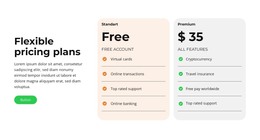
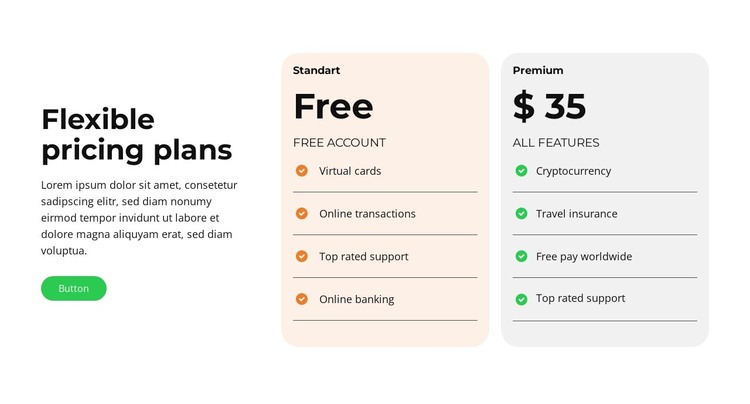
The left side of the block reads as stable page content: a “Flexible pricing plans” heading, supporting paragraph, and call-to-action button establish why the comparison is being shown. The action is kept outside the plan cards, which allows the two alternatives to remain focused on their own information. This separation is useful when the section is placed within a WordPress-managed page alongside other publishable content, such as service explanations or contact information.
On the right, two pricing cards use matching internal structures. Each one presents a plan identity, price, subtitle, and four feature rows, with dark dividers marking the boundaries between included items. The pale peach and pale gray fills distinguish the alternatives without making them structurally unequal, and the rounded corners give both cards the same visual status. Visitors can therefore scan the repeated rows while still recognizing which plan they belong to.
As WordPress-oriented page content, the block works best as a reusable visual region rather than as a complete theme or site structure. The surrounding project can manage the wider page, navigation, and related content, while this section retains its focused comparison role. Its static arrangement also keeps the plan information visible together, making the block a practical destination for a page that needs a concise, side-by-side presentation of account or payment options.
Customize with Nicepage
Open this ready-made template in the WordPress Website Builder and customize it visually in the Nicepage editor. Replace demo content, edit page sections, and adapt the design to your project without rebuilding the template from scratch.
Edit Template Offline
2. Create a new page or select existing
3. Click Add new block, search for id 6446126 and click enter
Edit Template Online
Create Awesome Websites


Free Nicepage Builder
Keywords
Manage and Edit This Theme in WordPress
Customize and Install the WordPress Theme
Start with this ready-made theme instead of building the WordPress design from scratch. Customize its layout, content, typography, images, sections, and other design elements visually in Nicepage editor, then export and install the WordPress Theme, Plugin, and Pages on your WordPress site. The Nicepage WordPress Plugin lets you continue working with the site after installation.
Edit the Theme Directly in WordPress
After installation, you can edit the WordPress Theme directly in WordPress with the Nicepage WordPress Plugin. Use Site Style to customize site Colors, Fonts, Header, Footer, Blog, and Post Page Templates while working within your WordPress website.
Edit WordPress Pages Visually
Use the Nicepage WordPress Plugin to edit page content directly from the WordPress admin area. Open a WordPress Page with Nicepage and visually change its text, images, sections, and other page elements while continuing to manage the Page through WordPress.
WordPress Content and Theme Integration
Use the customized theme with WordPress Pages, Posts, Blog and Post Templates, menus, widgets, and other CMS-managed content. Shared theme elements such as Colors, Fonts, Header, Footer, Blog, and Post Page Templates can be managed as part of the overall site design, while WordPress provides the CMS environment for managing site content.
This workflow combines a ready-made WordPress Theme with visual customization, direct theme editing in WordPress, and continued content management through the Nicepage WordPress Plugin.