Creator ad other pricing plans WordPress Theme


Permanent Plan Content Organized for a WordPress Page
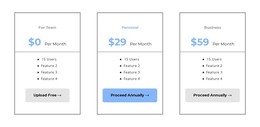
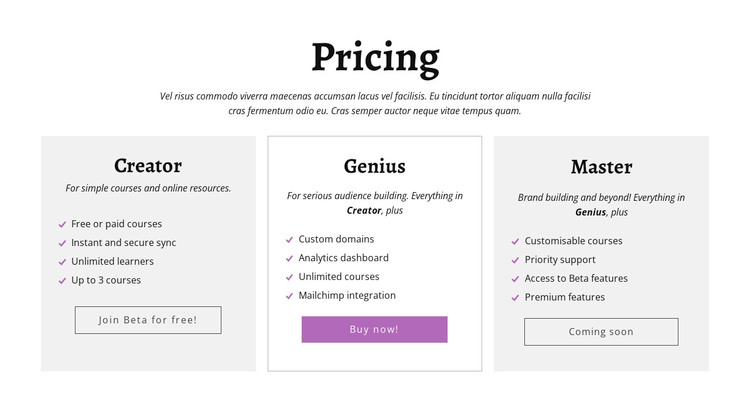
The centered introduction gives the block a stable subject—pricing—before the three plan groups present the actual page content. Creator, Genius, and Master can remain as a reusable comparison area on a WordPress-managed page because each card has a defined content role and action. The section is not dependent on a stream of editorial posts; it reads as lasting information about course-platform options.
The plan content can be understood through its distinct levels. Creator lists free or paid courses, secure synchronization, unlimited learners, and up to three courses. Genius focuses on custom domains, an analytics dashboard, unlimited courses, and Mailchimp integration. Master adds customisable courses, priority support, beta features, and premium features. The labels Join Beta for free!, Buy now!, and Coming soon keep the response associated with the relevant plan rather than with the section as a whole.
The three-column row, light-gray outer cards, white bordered center card, and repeated feature-list pattern give the page content a consistent visual region. In a WordPress-oriented project, this block can sit within a broader page whose other content is managed separately. The interpretation concerns publishable pricing content inside that environment, not a claim that the block itself is a complete WordPress Theme or contains specific CMS objects.
Customize with Nicepage
Open this ready-made template in the WordPress Website Builder and customize it visually in the Nicepage editor. Replace demo content, edit page sections, and adapt the design to your project without rebuilding the template from scratch.
Edit Template Offline
2. Create a new page or select existing
3. Click Add new block, search for id 439256 and click enter
Edit Template Online
Create Awesome Websites


Free Nicepage Builder
Keywords
Manage and Edit This Theme in WordPress
Customize and Install the WordPress Theme
Start with this ready-made theme instead of building the WordPress design from scratch. Customize its layout, content, typography, images, sections, and other design elements visually in Nicepage editor, then export and install the WordPress Theme, Plugin, and Pages on your WordPress site. The Nicepage WordPress Plugin lets you continue working with the site after installation.
Edit the Theme Directly in WordPress
After installation, you can edit the WordPress Theme directly in WordPress with the Nicepage WordPress Plugin. Use Site Style to customize site Colors, Fonts, Header, Footer, Blog, and Post Page Templates while working within your WordPress website.
Edit WordPress Pages Visually
Use the Nicepage WordPress Plugin to edit page content directly from the WordPress admin area. Open a WordPress Page with Nicepage and visually change its text, images, sections, and other page elements while continuing to manage the Page through WordPress.
WordPress Content and Theme Integration
Use the customized theme with WordPress Pages, Posts, Blog and Post Templates, menus, widgets, and other CMS-managed content. Shared theme elements such as Colors, Fonts, Header, Footer, Blog, and Post Page Templates can be managed as part of the overall site design, while WordPress provides the CMS environment for managing site content.
This workflow combines a ready-made WordPress Theme with visual customization, direct theme editing in WordPress, and continued content management through the Nicepage WordPress Plugin.