Modern motocycling WordPress Theme


A Model-Focused Hero Section for WordPress Page Content
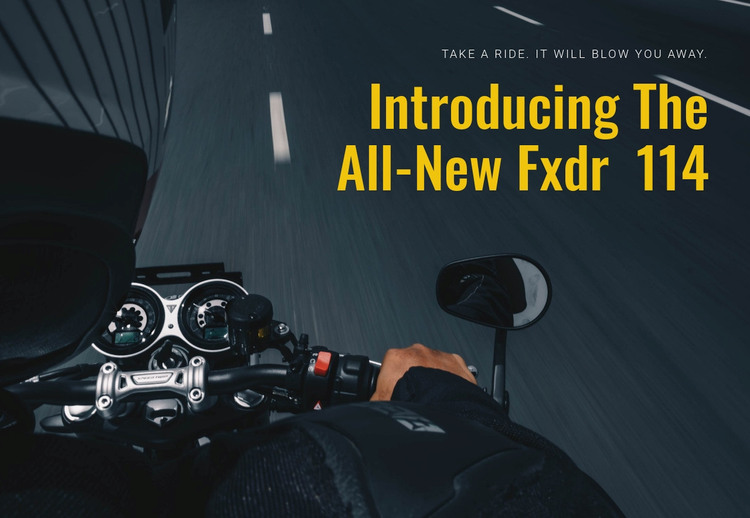
The motorcycle scene provides the primary visual context, while the compact right-side overlay turns that image into a clear introduction for the Fxdr 114. The tagline offers a short supporting statement, and the large yellow heading gives the section its strongest information point: “Introducing The All-New Fxdr 114.” With the text grouped in the upper-right and the cockpit extending through the left and lower areas, the block presents the model without adding a card grid, specification list, or secondary content region.
Within a WordPress-managed site, this section can work as stable page content for a motorcycle or transportation presentation. It may introduce a model before later page content expands on equipment, performance, media, or related information. The concise wording also leaves the surrounding project free to manage longer descriptions and additional publishable content without changing the role of this visual opening section.
The block is not a standalone WordPress Theme; it is one prepared content area that can participate in a broader page design. When adapting it, the image and text relationship should remain central. A replacement image should keep enough dark contrast behind the light tagline and bright heading, while the right-side alignment should continue to distinguish the message from the motorcycle action visible elsewhere in the frame.
Customize with Nicepage
Open this ready-made template in the WordPress Website Builder and customize it visually in the Nicepage editor. Replace demo content, edit page sections, and adapt the design to your project without rebuilding the template from scratch.
Edit Template Offline
2. Create a new page or select existing
3. Click Add new block, search for id 48596 and click enter
Edit Template Online
Create Awesome Websites


Free Nicepage Builder
Keywords
Manage and Edit This Theme in WordPress
Customize and Install the WordPress Theme
Start with this ready-made theme instead of building the WordPress design from scratch. Customize its layout, content, typography, images, sections, and other design elements visually in Nicepage editor, then export and install the WordPress Theme, Plugin, and Pages on your WordPress site. The Nicepage WordPress Plugin lets you continue working with the site after installation.
Edit the Theme Directly in WordPress
After installation, you can edit the WordPress Theme directly in WordPress with the Nicepage WordPress Plugin. Use Site Style to customize site Colors, Fonts, Header, Footer, Blog, and Post Page Templates while working within your WordPress website.
Edit WordPress Pages Visually
Use the Nicepage WordPress Plugin to edit page content directly from the WordPress admin area. Open a WordPress Page with Nicepage and visually change its text, images, sections, and other page elements while continuing to manage the Page through WordPress.
WordPress Content and Theme Integration
Use the customized theme with WordPress Pages, Posts, Blog and Post Templates, menus, widgets, and other CMS-managed content. Shared theme elements such as Colors, Fonts, Header, Footer, Blog, and Post Page Templates can be managed as part of the overall site design, while WordPress provides the CMS environment for managing site content.
This workflow combines a ready-made WordPress Theme with visual customization, direct theme editing in WordPress, and continued content management through the Nicepage WordPress Plugin.